All Blogs /
15 Best ATS for Recruitment and Staffing Agencies in 2026
15 Best ATS for Recruitment and Staffing Agencies in 2026
Sagrika Jain |
December 6, 2025 |
17 Min read
Applicant tracking software (ATS) helps recruiting agencies manage candidate data, streamline recruitment operations, and create a highly efficient recruiting process. With the advancement in AI, the role of ATS has changed from being a system of record to a system of productivity. Choosing the best ATS for recruiting and staffing agencies is even more lucrative.
In this blog, we will explore why recruiting and staffing agencies need an ATS, how it can save time, increase productivity, and drive revenue outcomes effectively.
With so many options available, it is important to have a well-defined approach to choose the ATS. To help you get started, we’ve done the heavy lifting for you and created a list of the best applicant tracking software available in the market with the pros, cons, ratings, and pricing for each ATS option.
What to Look for in an Applicant Tracking Software (ATS)?
Most ATS today offer a host of features tailored to the needs of recruiting and staffing agencies. Here’s a simple checklist you can use to identify the software that meets your needs optimally.
Features and Advancements
Over the years, ATS has become an integral part of the recruitment process. The days of operating spreadsheets are gone and we are now in the age of AI. Most ATS talk about AI features, but in reality they are advanced automations. So, when it comes to features and advancements, you must understand if AI features are built on top of the existing system or natively integrated.
Ideally, an ATS should help recruiters source candidates effectively, manage pipelines, schedule interviews, and engage candidates better.
Analytics and Reporting
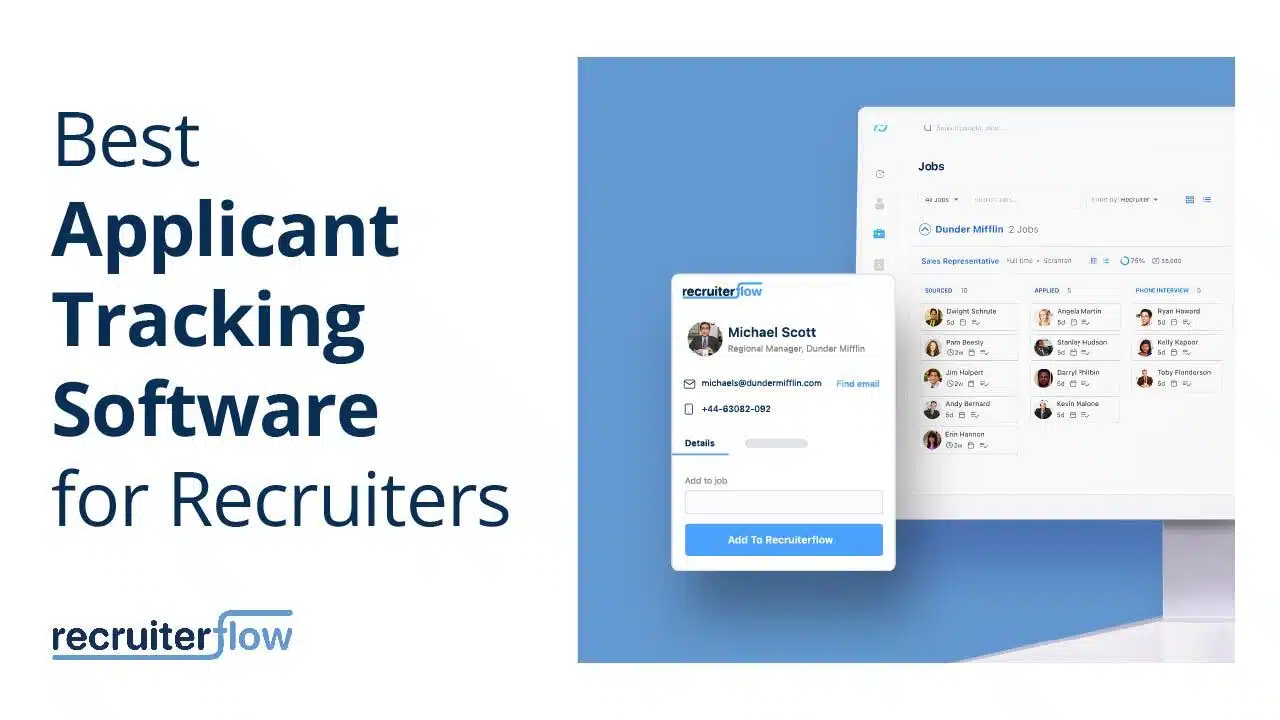
At the heart of any recruiting strategy is data. Outdated data means lost opportunities. An ATS system must have advanced analytics capabilities and reporting features. For example, Recruiterflow allows users to create custom dashboards which makes it easy to create reports that mimic the operational flow of your agency.
Integrations
The fundamental idea of an ATS should be to reduce the number of tabs recruiters have to shift between to post a job, set up interviews, or even create workflows. An ideal ATS should offer integrations that work with your existing tools ensuring a seamless adoption.
Cost Predictability
Recruiting is a tricky business, and agencies invest a lot of money in subscriptions and tools to optimize their recruitment operations. So, when it comes to an ATS, the cost predictability is extremely important to avoid awkward conversations with the finance team. Most ATS platforms offer advanced features as add-ons. This makes it difficult to predict cost. When you are evaluating an ATS, don’t forget to understand the pricing plans in detail.
Ease of Use
Most ATS platforms offer a training or onboarding module before recruiters can start using it. These are mandatory training modules that not only add to the cost but often end up being an inconvenience. An ATS platform should be intuitive and easy to use. Recruiterflow is known for its easy-to-use interface and has no training or onboarding modules. Recruiters can start using the platform from the first day.
List of Best ATS for Recruitment and Staffing Agencies
Recruiterflow’s ATS & CRM Rated 4.8/5 on Capterra.
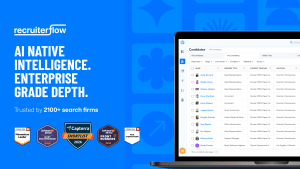
Recruiterflow is an AI-native recruiting system built for retained, contingent, and executive search firms. Unlike most platforms that bolt AI onto a legacy core, Recruiterflow was designed with AI at the centre — through AIRA, an intelligence layer that runs across sourcing, outreach, matching, and pipeline management automatically.
Pricing: $119/user/month
Best for: Retained, contingent, and executive search firms of all sizes — from boutique firms to global operations.
Key capabilities:
AI candidate matching, context capture, and next-action surfacing via AIRA
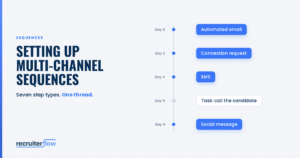
Multi-channel sequences across email, LinkedIn, SMS, and calls
Client portal, deal pipeline, and collaborative hiring in one system
“With Bullhorn, you have to bolt something on and manage a separate vendor relationship. Recruiterflow had everything integrated.” — Chris Leuzze, FloodGate
Outcomes: 676% more job orders (Believe Resourcing) · 2× placements (PAC Solutions) · 40% more submittals (Guy Last Recruitment)
G2 Rating: 4.0/5
Capterra Rating: 4.1/5
Pricing: Available upon request.
LinkedIn Integration: No
Suitable for: Staffing Agencies
Bullhorn ATS is a cloud-based recruiting software. Its advanced analytics features track your recruiting activity and transform it into actionable business insights with configurable reports tailored to your goals and KPIs.
Pros:
It is easy to input and attach notes to specific files about job orders, candidates, clients, and contacts.
It offers useful integration options.
The platform is entirely customizable.
Cons:
The UI/UX is not user-friendly.
The platform lacks automation functionalities.
Advanced features are add-ons increasing the cost.
3. Freshteam by Freshworks – Free ATS Software
G2 Rating: 4.4/5
Capterra Rating: 4.4/5
Pricing: Plans start from $1.20/employee/month
LinkedIn Integration: Yes
Suitable for: Small and growing staffing and recruitment agencies
Freshteam stands out as a top-tier ATS solution available in the market. The platform presents an enduring free plan that accommodates the management of up to 50 employees. It encompasses three job postings, an employee directory, and time-off management functionalities.
Pros:
It offers 100+ in-built job description templates.
The software is mobile-friendly.
It allows integrations with multiple free premium job boards and social media channels.
Cons:
The application can be slow at times.
It requires CVs to be uploaded in PDF format only.
The free version does not come with AI capabilities.
It is costly for companies looking for just ATS functionalities and not any other HR services
G2 Rating: 4.4/5
Capterra Rating: 4.4/5
LinkedIn Integration: Yes
Pricing: Plans start from $30/user/month.
Suitable for:
Zoho Recruit is a robust ATS and CRM software. It offers a user interface that is infinitely customizable, plus a free-forever version.
Pros:
It publishes jobs on over 75 job boards in one click.
It offers 50+ software integrations.
The platform is budget-friendly and user-friendly.
Cons:
Although Zoho offers multiple integrations, users may experience issues when integrating with software outside the Zoho ecosystem.
The platform is relatively slow to load.
Mobile App is not powerful
5. Recruitee
G2 Rating: 4.5/5
Capterra Rating: 4.4/5
Pricing: Plans start from €199/month.
Recruitee is a recruitment software that helps recruiters in sourcing, automate recruiting, and evaluate candidates effectively. The platform’s easy-to-use. You can customize your dashboard and reports. It also allows you to curate and send talent assessments to candidates to evaluate their skills.
The software also comes with in-built scheduling features that effortlessly schedule interviews and notify every party involved of the interview durations.
Pros:
The software offers more than 120 third-party software integrations.
It is GDPR compliant.
It enables transparent job management with a Kanban flow
Cons:
The mobile version experiences performance issues.
The customer service is unresponsive.
6. BambooHR
G2 Rating: 4.5/5
Capterra Rating: 4.6/5
LinkedIn Integration: Yes
Pricing: Available upon request.
BambooHR is a complete human resources information system (HRIS). It bundles features like payroll, time tracking, employee engagement, an applicant tracking system (ATS) into one platform.
Pros:
It offers unlimited customization features.
It has an intuitive and interactive interface.
It automatically sends notifications.
Cons:
The platform experiences minor technical and performance glitches.
The reporting features are not reliable.
7. JazzHR
G2 Rating: 4.4/5
Capterra Rating: 4.3/5
LinkedIn Integration: Yes
Pricing: Plans start from $49/month.
JazzHR is powerful, user-friendly and affordable ATS & recruiting software.
Recruiters can create personalized messages and email templates. It also triggers real-time notifications on the latest activities of the candidates.
Pros:
It offers countless customization options.
The platform is user-friendly.
It offers eDocuments and eSignature features.
Cons:
There is no option to avoid duplicate applicants.
Although it offers multiple integration options, specific integrations can be challenging to set up.
8. Greenhouse
G2 Rating: 4.4/5
Capterra Rating: 4.5/5
LinkedIn Integration: Yes
Pricing: Available upon request.
Greenhouse offers comprehensive support to organizations throughout the entirety of their recruitment journey. It simplifies hiring through automation and data analytics. Furthermore, it fosters collaborative efforts among team members, employs diverse candidate sourcing avenues, and constructs a candidate experience that cultivates the desire for future applications.
Moreover, Greenhouse assures compliance with GDPR, elevating its security and operational efficiency. The adept integration ecosystem seamlessly facilitates data exchange between Greenhouse and alternative HR systems.
Pros:
The application offers more than 450 integrations.
It delivers the overall progress with 40+ essential reports and snapshot dashboards.
It also tailors organized plans to help recruiters assess the right skills, traits, and qualifications.
Cons:
The UI/UX is complex.
It is tough to create custom reports.
Pricing not transparent
9. Workable
G2 Rating: 4.6/5
Capterra Rating: 4.4/5
LinkedIn Integration: Yes
Pricing: Plans start from $149/month.
Workable is an all-inclusive applicant tracking software that revolutionizes recruitment with advanced AI recruiting capabilities. With access to a vast pool of 400 million candidate profiles, Workable employs sophisticated algorithms to identify the most qualified candidates.
Moreover, the platform incorporates anonymized screening features to mitigate unconscious bias and promote fair recruiting decisions. Workable goes beyond traditional applicant tracking software by offering talent assessment tools, including scientifically backed cognitive and personality pre-employment tests, to ensure that candidates possess the necessary skills to excel.
Pros:
It offers integrations with 70+ third-party tools.
It provides recruiters with one-way video interviewing functionalities.
The software is GDPR, CCPA, and EEOC/OFCCP compliant.
Cons:
It does not use a Boolean search to find resumes that align with specific position requirements.
The platform does not label disqualified candidates.
10. Rippling
G2 Rating: 4.8/5
Capterra Rating: 4.9/5
LinkedIn Integration: Yes
Pricing: Available upon request.
Rippling is a comprehensive platform with tools for candidate searching, recruiting, and onboarding. It offers a simple ATS where recruiters can quickly publish open opportunities to every platform, from Indeed to LinkedIn, to build your candidate pipeline with the best talent.
You can set up custom recruiting workflows and processes and customize interview stages based on position, department, or seniority. You can also integrate Outlook, iCal, Google, and more to view people’s availability and schedule each interview stage quickly.
Pros:
It has a simple and intuitive interface.
It offers countless software integrations.
The platform is easy to navigate.
Cons:
It supports only one language, English.
The customer service is unresponsive and poor.
11. BreezyHR – Free ATS Software
G2 Rating: 4.4/5
Capterra Rating: 4.5/5
LinkedIn Integration: Yes
Pricing: Plans start from $157/month.
BreezyHR has emerged as a prominent player among the top applicant tracking systems in the field. Its forever-free plan sets it apart from most of its rivals. This encompasses boundless users and candidates, wide-reaching distribution to more than 50 job boards, and sophisticated résumé parsing capabilities. An upgrade to the Startup plan is required to access further enhancements such as background screening, candidate questionnaires, and adaptable workflows and stages.
Pros:
It has an intuitive and user-friendly interface.
You can post on more than forty job boards for free.
It offers a built-in scorecard system.
Supports over 20 languages
Cons:
The program does not offer options to view multiple resumes simultaneously.
The reporting and analytics capabilities are limited.
Low-cost paid plan not available
12. Ceipal ATS
G2 Rating: 4.6/5
Capterra Rating: 4.6/5
LinkedIn Integration: Yes
Pricing: Available upon request.
Ceipal ATS is an AI-powered, end-to-end ATS software that accelerates candidate selection. Once you have updated the expected candidate qualifications, the platform scours every nook and corner of the internet and delivers hundreds of resumes of the relevant candidates.
You can skim through the resumes with the help of AI-powered candidate Analytics features which vividly outline the candidate’s skills, expertise, and personality types. With this information, you can contact the candidate who closely matches your expectations without your emails falling into the spam folders.
Pros:
It offers AI-powered candidate recommendations for job positions.
You can send bulk emails with one click reaching everyone on your email list instantly..
G2 Rating: 4.7/5
Capterra Rating: 4.9/5
LinkedIn Integration: No
Pricing: Plans start from $85/user/month.
Recruit CRM is an end-to-end ATS software that assists recruiters in managing recruitment, clients, and candidates in a single platform. Its Chrome extension sources candidates directly from job posting platforms, and the parser instantly parses through the influx of resumes and pinpoints candidates with adept talents.
With the gathered information, you can effortlessly organize candidates in a simplified Kanban view. Here, you can schedule interviews, engage with clients, and recruit the perfect candidate.
Pros:
This ATS benefits you by letting you send bulk emails.
With the Hotlist feature, you can create lists of candidates for future use.
It offers a variety of search functionalities like boolean, radius, and many more.
Cons:
The platform does not offer Zapier integrations.
It lacks offer letter management.
14. Jobvite
G2 Rating: 4.0/5
Capterra Rating: 4.1/5
Pricing: Available upon request.
Jobvite is an all-in-one solution that offers every tool necessary for talent acquisition. The platform provides flexible customization options for recruiters to configure dashboards and workflows to manage the recruitment life cycle effectively.
The platform also encompasses automation features that expedite recruitment procedures and enhance the chances of identifying ideal candidates.
Pros:
It offers fundamental time analytics tools.
It has e-signature features that let you sign, seal, and deliver contracts within the same platform.
The ATS software also uses bias blocker functionalities for bias-free recruiting decisions.
Cons:
The platform uses keywords to identify candidates, and sometimes good candidates are missed if they do not use the exact same keywords in the resumes.
It does not offer MS team integrations for interviews.
15. Pyjama HR
G2 Rating: 4.4/5
Capterra Rating: 4.6/5
Pricing: Plans start at $100/month.
Pyjama HR is an AI-based recruitment software that allows recruiters to automate the recruitment process for organizations and recruiters. This free applicant tracking software addresses recruiters’ pain points during the recruiting journey and offers simplified solutions but lacks personalization functionalities and assessment options.
From posting jobs on multiple platforms simultaneously in one click to filtering top candidates effortlessly with intelligent filters, Pyjama HR is the best solution for those involved in mass recruiting projects.
Pros:
The software offers multiple third-party software integrations.
It offers Chrome extensions for candidate import.
It also provides a 360-degree candidate comparison view.
Cons:
Customization options are limited.
The UI experiences occasional glitches.
What are the Common Features of Applicant Tracking Systems?
AI Agents
AI agents are no longer good to have – they are a must-have for recruiting and staffing agencies. An AI applicant tracking system helps recruiters double their productivity and close more deals. AI Agents can better candidate sourcing, outreach, and engagement at scale.
Automated job posting
Most ATS integrates with multiple job boards that helps recruiters to post their job posts on multiple job boards in just a single click.
Email Automation
Modern ATS comes equipped with native email tools. Recruiters can send branded emails to potential candidates, prompting them to complete applications or providing updates on their application status.
Customized career pages
ATS provides tools to create attractive landing pages that showcase a company’s brand, mission, and culture, making job postings stand out.
Custom applications
Companies can create tailored job applications with specific fields, simplifying the process for applicants and ensuring data is formatted correctly.
Employee referral tools
ATS facilitates employee referrals by offering portals for employees to recommend candidates and track their progress in the recruitment process.
Resume Parsing
ATS automatically analyzes and organizes resumes, extracts relevant data and stores it in a database for easy access and tracking.
Applicant tracking
ATS enables recruiters to track candidate applications throughout the recruitment process, with customizable workflows and alerts for stakeholders.
Interview scheduling
ATS streamlines the management of interview scheduling by allowing recruiters to designate interview times and send invitations to candidates.
Candidate scoring
ATS provides a centralized platform for interviewers to leave notes and scores for candidates, helping to standardize evaluations and reduce bias.
Analytics report
ATS generates actionable insights by analyzing data points, such as the effectiveness of job boards and campaigns, time-to-hire metrics, and demographic characteristics of candidate pools.
Candidate Relationship Management
ATS offers communication features for recruiters to engage with candidates, ranging from email plugins to fully developed CRM-like functionality with profiles and engagement tracking.
Also, check our detailed blog on Questions to ask your ATS vendor.
Benefits of using an Applicant Tracking System
ATS automates laborious tasks like composing and transmitting emails, interview arrangements, and feedback collection. This translates into saved time and reduced costs by eliminating manual workflows.
Hiring teams can monitor applicants and identify the most suitable candidates. This facilitates swift candidate evaluation and enables well-informed hiring decisions.
ATS assists in effectively managing extensive applicant pools by categorizing them and tracking their progress throughout the recruitment journey.
Employers can tailor their ATS to meet specific requirements, accommodating unique organizational needs.
Real-time analytics offered by ATS aid employers in identifying bottlenecks and refining the recruitment process.
ATS ensures adherence to legal and industry regulations such as GDPR, promoting a compliant recruitment environment.
ATS can provide a comprehensive overview of applicant data, encompassing résumés, test scores, interview insights, and more.
Employers can monitor their recruitment budget and compare diverse job postings using ATS.
ATS elevates communication between recruiters, hiring managers, and prospective candidates, resulting in a well-organized and seamless recruitment process.
ATS enhances businesses’ capacity to source and select candidates, thus attracting top-tier talent.
ATS offers valuable insights into recruitment processes, empowering employers to refine strategies for future hiring endeavors.
If you are still unsure as to why you need applicant tracking software for your recruitment business.
FAQs
What is Applicant Tracking Software?
An applicant tracking system (ATS) is a specialized software that companies and agencies utilize to facilitate the organization and monitoring of job applicants. Typical components of an ATS encompass applicant tracking, résumé parsing, automated correspondence, interview arrangement, candidate collaboration tools, and comprehensive analytics and reporting. An Applicant tracking system’s main objective is to streamline the entire recruitment process, thereby enhancing efficiency for recruiters.
Moreover, ATS aids companies in ensuring the conformity of their recruitment procedures with legal and industry mandates. Through the automation of recruitment processes, businesses can economize time and resources while securing the acquisition of optimal candidates for their workforce.
It provides a range of features and functionalities, including database management, filtering capabilities, and comprehensive tools, enabling businesses of all sizes to efficiently handle candidate tracking, organization, and analysis.
How Does An Applicant Tracking System Work?
The Applicant Tracking System works by collecting and organizing resumes received through various channels, such as job boards or career websites. It parses and extracts relevant information from resumes, such as contact details and work experience, and stores it in a structured database. Recruiters can then search, filter, and sort candidates based on specific criteria, track their progress throughout the recruitment process, schedule interviews, and connect with them.
How does an ATS save money?
ATS saves money by streamlining the recruitment process, reducing manual effort and paperwork, and optimizing recruitment efforts. Thus, saving cost, time, and measures for recruiting firms.
Can an ATS integrate with other recruitment systems?
Yes, ATS platforms offer integration capabilities with other recruitment systems, such as CRM, talent assessment tools, payroll software, background check software, or video interviewing tools. Recruiterflow has an inbuilt CRM and offers
What is the difference between ATS and a job portal?
While the job portal is a platform where recruiters can post job listings and candidates can search and apply for jobs, ATS is a software system designed to manage the entire recruitment process, from receiving applications to recruiting decisions.
Is there a free applicant tracking system?
Yes, there are free applicant tracking systems available, although their features and functionality may be limited. These free ATS options can facilitate basic recruitment and selection processes and are particularly useful for small businesses in their early stages. Nevertheless, as companies grow, they typically transition to paid ATS solutions in order to fully leverage the extensive features and capabilities offered.
Is Applicant Tracking Software Effective?
According to a survey done by Zippia, 94% of recruiting agencies that use ATS systems report that the software has improved their hiring process.
Software and Tools
Sagrika Jain is an accomplished Content Marketing Lead with over 14 years of experience specializing in the HR tech niche. She holds a Master’s degree in Mass Communication and an MBA with a specialization in Human Resources. Leveraging her deep expertise in crafting SEO-optimized and social media-friendly content, Sagrika develops insightful, strategy-driven materials that integrate effective communication techniques with cutting-edge HR practices. Her work empowers organizations to achieve their strategic goals and enhance operational effectiveness.


Sagrika Jain