13 min read

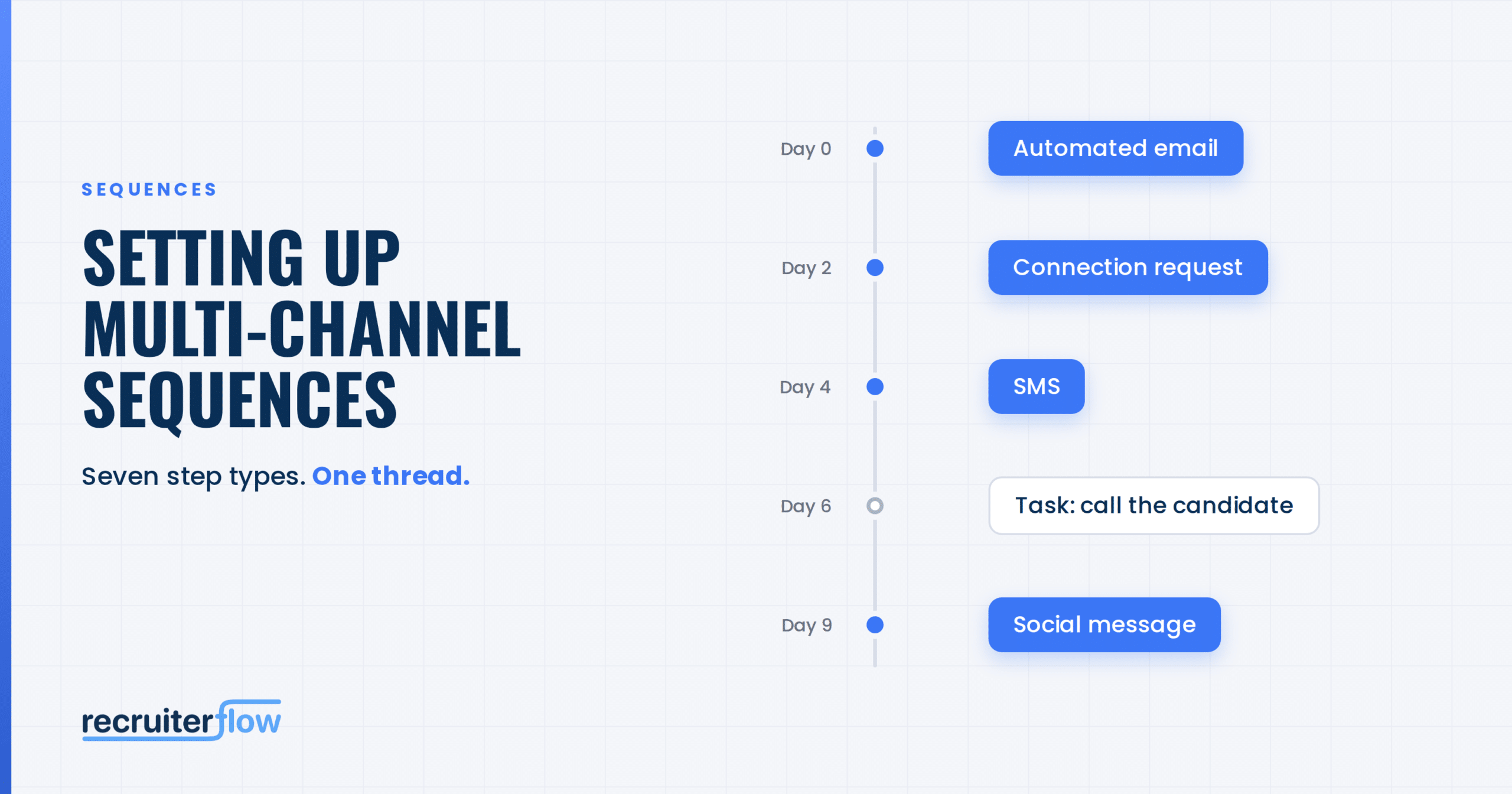
Recruiters manage candidate and client relationships simultaneously. Some people respond to email. Some engage on professional networking platforms. Others need an SMS or call before a conversation begins.
When every channel runs through a different tool, the sequence breaks between them. The CRM holds the relationship history, but another platform runs email. A separate tool manages social outreach. Calls become reminders someone has to remember. Replies and outcomes must be synced back.
Multi-channel sequences on Recruiterflow bring the entire outreach system into the CRM, where the relationship context already lives. Email, social outreach, SMS, and tasks run as one coordinated sequence. Branching logic automatically routes each person to the right next step. Channel-level and step-level reporting shows exactly what drives results.
The result is not simply more outreach. It is more conversations and placements making it the most powerful sequencing engine out there, built from scratch for recruiting.
This guide shows you how to set up your first sequence and use the two capabilities unique to Recruiterflow to their full potential: adaptive branching and reporting that goes down to the individual step.
Your CRM contains the context required to make outreach relevant:
When the sequence runs outside the CRM, that context travels between systems and gaps appear. Actions are missed and disconnected tools cannot interpret information held in another.
Recruiterflow removes that architectural gap. Outreach runs where the relationship is managed. Replies are updated in the CRM, branching logic ensures the sequences runs exactly how you design it, follow-ups are timely, and the team sees the full communication history without reconciling separate platforms.
Recruiterflow supports the following step types:
Open Sequences from the left sidebar and select Create Sequence.
Give the sequence a name that tells your team what it is for.
For example: Healthcare Accounts: Re-engagement Sequence
A descriptive name becomes more important as the team builds multiple sequences and compares their performance.
Select the type of person you want to reach:
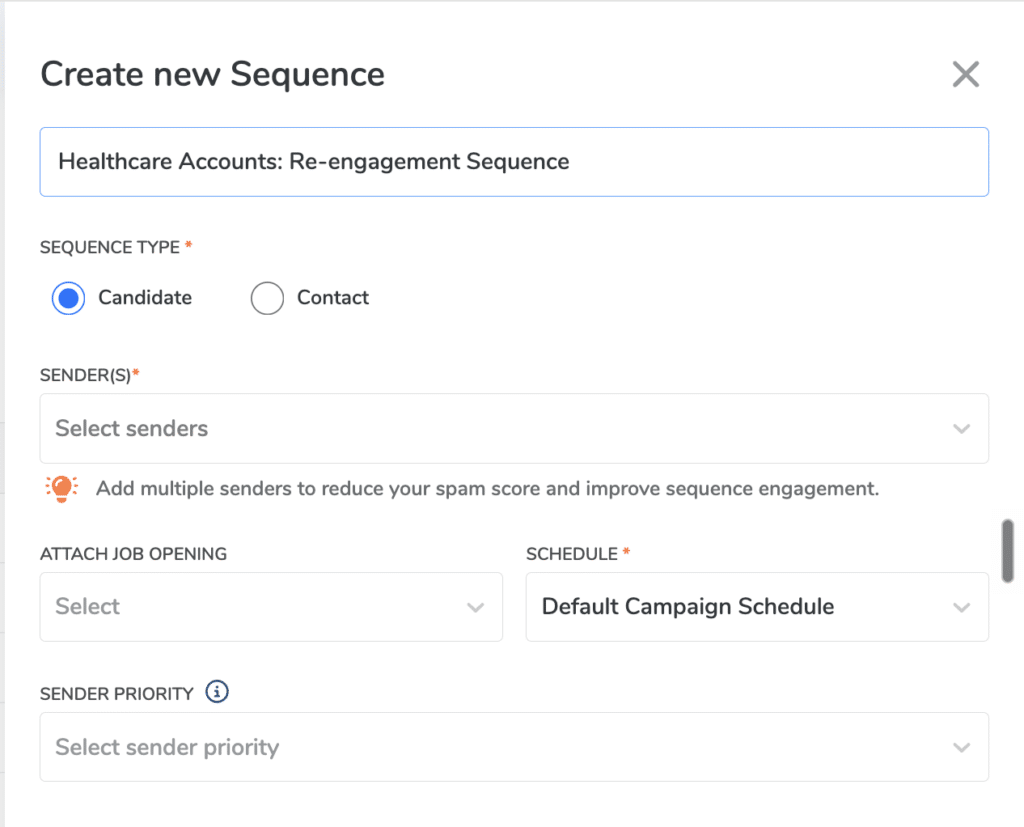
The sequence type determines the personalization fields and recipient filters available. Candidate sequences can also be attached to a job opening.
If you attach a job, Recruiterflow can move candidates to a selected stage when the sequence starts or when they reply. This connects outreach directly to the recruiting workflow.
Add at least one user or configured email alias to the Sender List. Then tell Recruiterflow how to assign a sender to each recipient:
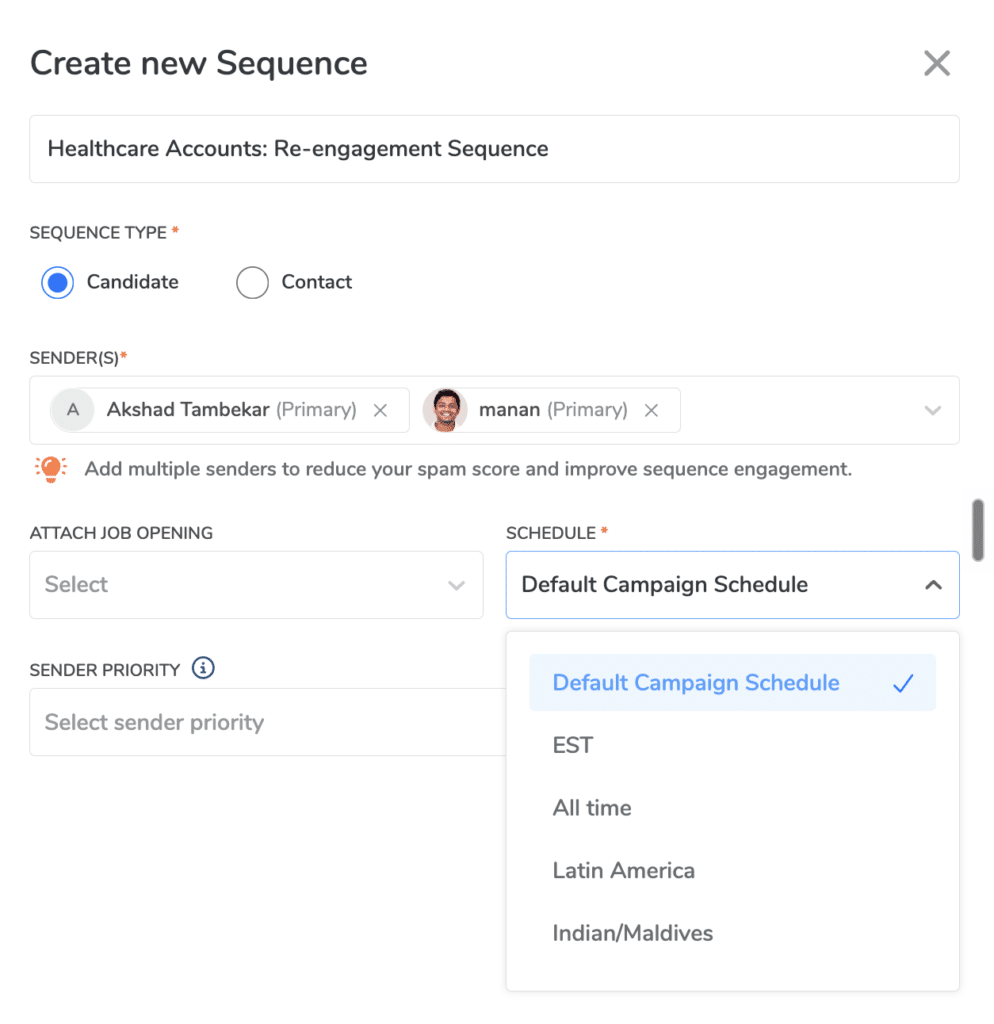
For business development, Lead Owner protects account ownership. For re-engagement, Recent Communicator preserves continuity. For higher-volume outreach, round-robin spreads recipients across the team.
Recruiterflow assigns one sender to each recipient at launch. That sender stays with the recipient throughout the sequence, preserving a consistent conversation.
Select the days and times during which the sequence can send messages. Schedules are configured at the account level.
If the right schedule is unavailable, an Admin can create one under Account Settings > Schedule Settings. Choose a window that reflects the recipient’s working hours and location.
Choose the channel that should open the conversation. An Automated Email is a common starting point.
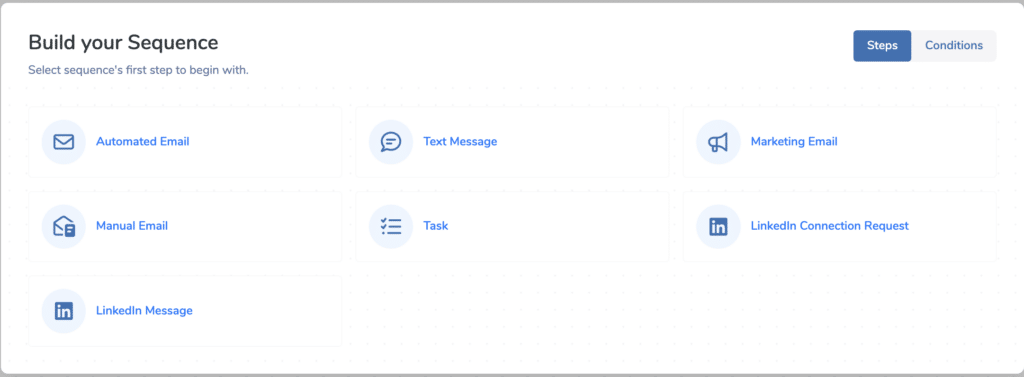
Most outreach tools treat every person the same: the same channels, in the same order, regardless of the relationship already in place.
That is not how recruiting conversations work.
Recruiterflow’s branching logic can detect whether a recipient is already connected to the sender and automatically change what happens next:
You can add another branch after the connection request. Ask Recruiterflow to wait for a set period, such as three days, and check whether the invitation was accepted:
No recruiter has to inspect the profile, choose a channel, or remember to revisit the contact. The system uses relationship context to move each person down the right path.
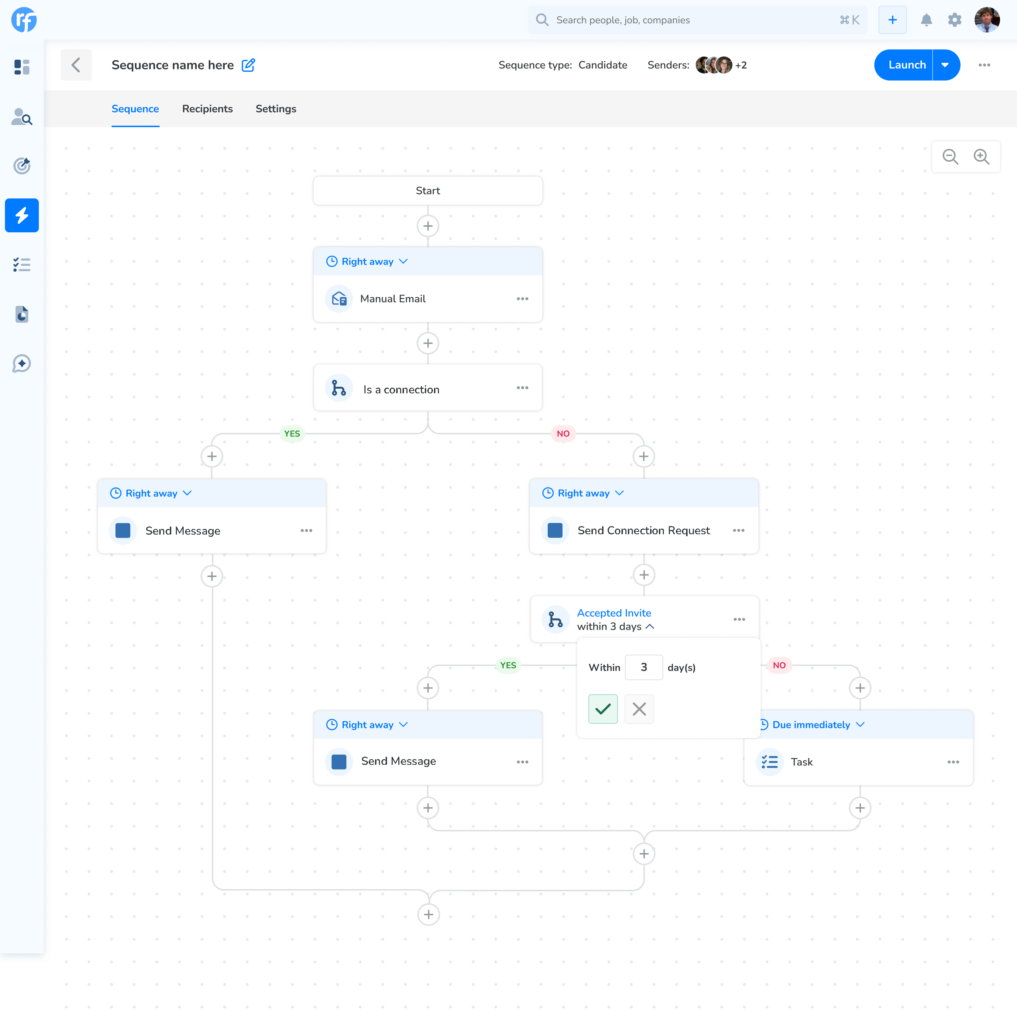
Placing email and social steps in one workflow does not make a sequence intelligent. The important question is whether the system knows which step is appropriate for each recipient.
Recruiterflow can make that decision because the sequence and relationship data live together. It can route based on connection status without relying on a manual check or external synchronization.
This is what turns multi-channel outreach from a list of touchpoints into a working system:
Branching logic is not an extra layer of automation. It is the capability that makes the channels behave as one sequence.
The most powerful sequence is not necessarily the one with the most automation. It is the one that knows where automation should stop and human judgment should begin.
Add a Task when a recruiter needs to call, research an account, or prepare before the next touchpoint. Set the title, description, priority, due date, and reminder.
The task is assigned to the recipient’s sequence sender and appears in both the sequence Tasks tab and the main Tasks page.
By default, completing the task starts the delay for the next step. If the sequence should continue when the task becomes overdue, enable Skip Step if task not completed by due date.
Use a Manual Email when the message benefits from review or deeper personalization. Recruiterflow prepares it when due, and the recruiter can send, schedule, or skip it from the Manual Emails tab.
Every step has its own delay, from zero to 365 days. You can exclude weekends when calculating it.
Avoid compressing several channels into a short window simply because the system makes it possible. Each step should create a new reason to engage, not repeat the previous message somewhere else.
For tasks, the delay determines the due date. The timer for the following step starts once the task is completed.
Add individual recipients from within the sequence or select candidates and contacts in bulk from their respective tables.
Use filters to keep the audience aligned with the sequence’s purpose. Before launch, review a sample of records and confirm that the personalization fields contain reliable data.
Choose the events that should stop the sequence for a recipient, including when the recipient replies or books an event on the sender’s calendar.
This is another advantage of running outreach where response data lives. The system can stop the remaining steps as soon as the sequence achieves its goal.
Recruiterflow validates the sequence before enabling launch. Check that:
Launch immediately or schedule the sequence for a future date and time. If you exit first, Recruiterflow saves it as a draft.
Once launched, each recipient moves according to the schedule, delays, assigned sender, connection status, and branch conditions you configured.
Most sequencing tools can tell you that a campaign is running. That is not enough to improve it.
Recruiterflow provides reporting at three levels.
See the complete outcome, including people reached, engagement, responses, and meetings booked.
This tells you whether the sequence achieved its goal. It does not force you to stop at the headline number.
Compare how each channel contributes to the result. See whether email, social outreach, or SMS drives engagement instead of treating the sequence as one blended campaign.
Channel-level reporting helps answer:
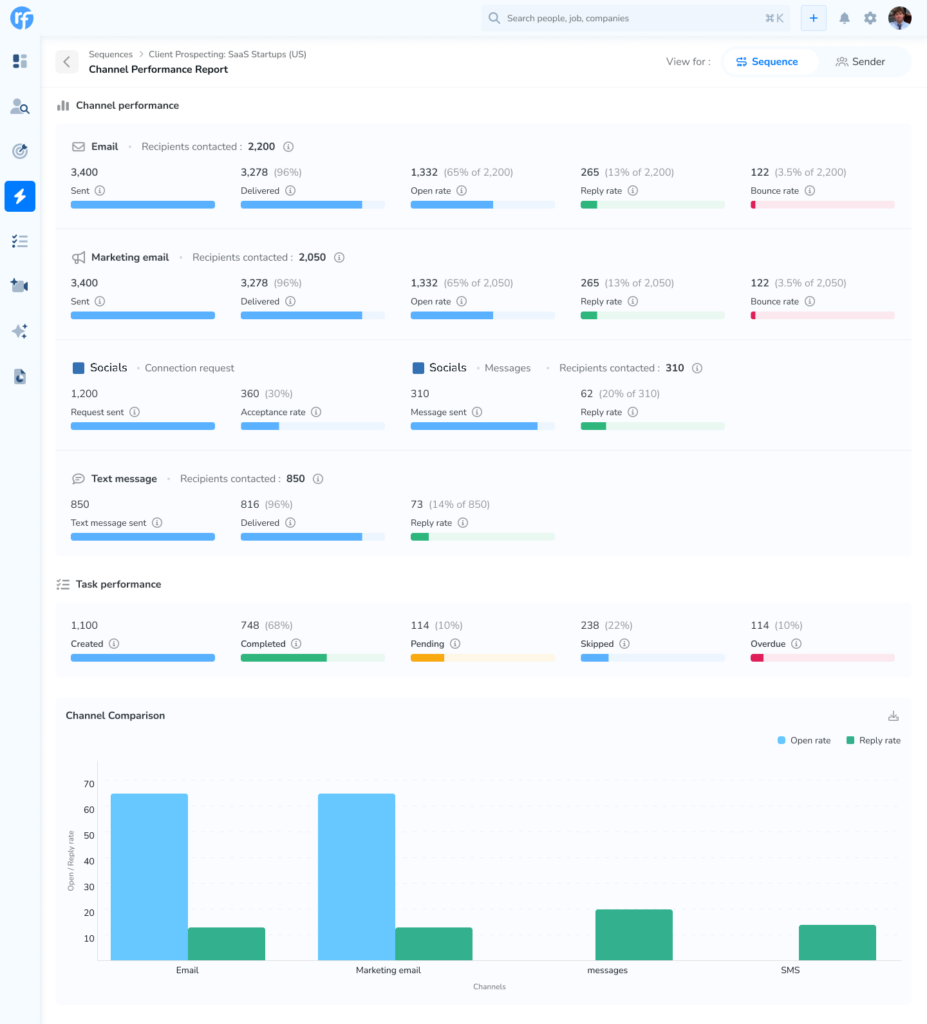
Inspect every step and branch independently.
The direct message sent to existing connections and the connection request sent to everyone else are different actions for different audiences. Recruiterflow reports them as distinct steps with their own performance instead of averaging them into one result.
Step-level reporting shows:
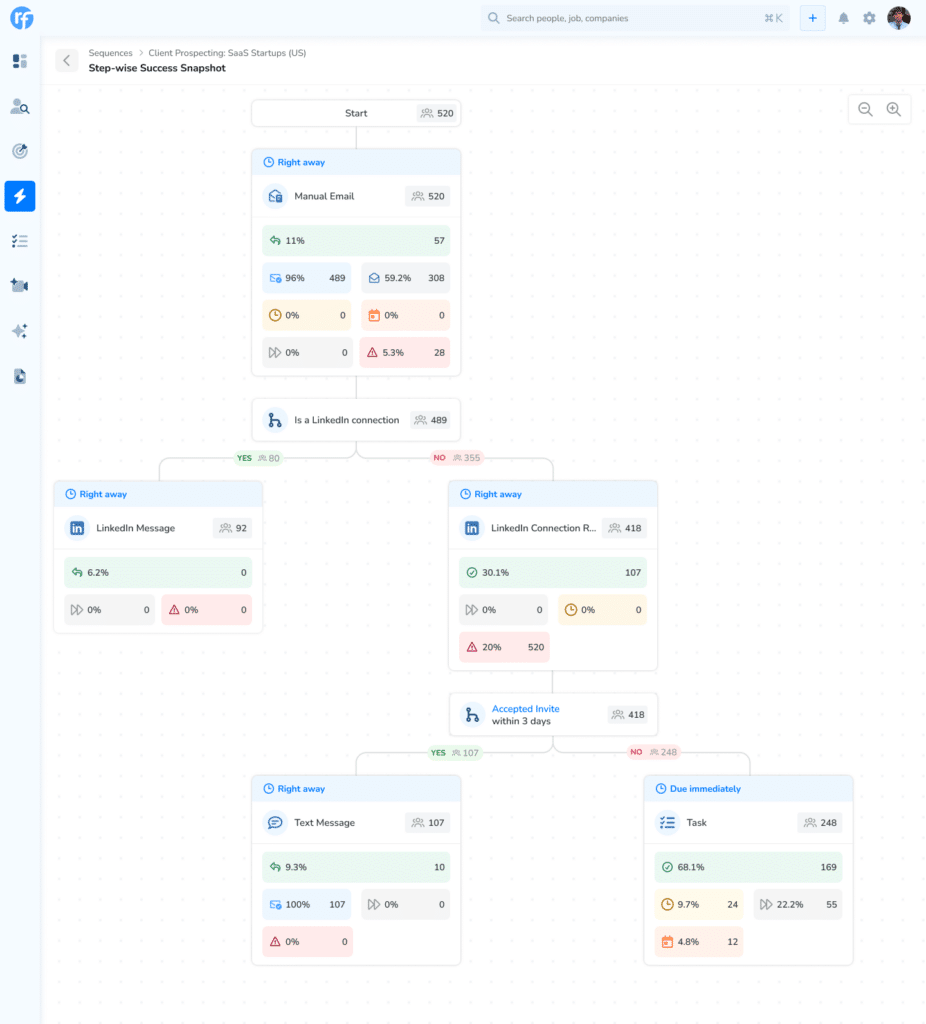
This reporting depth turns sequence improvement from guesswork into a repeatable operating process. When performance rises, you can see why, repeat the winning pattern, and build it into the team’s playbook.
Branching makes the sequence adaptive. Step- and channel-level reporting makes it improvable. Together, they create a system that gets smarter every time it runs.
After launch, use reporting to test the system rather than judging only the final reply rate:
Recruiterflow runs email, social outreach, SMS, and tasks natively inside the recruiting CRM. Its branching logic routes recipients according to connection status, while channel-level and step-level reporting shows exactly where engagement happens. The system is built for recruiting workflows rather than adapted from sales outreach.
Branching logic applies an if-then rule to decide the recipient’s next step. Recruiterflow can check whether someone is connected to the sender. Connected recipients receive a direct message, while others receive a connection request or email.
Channel-level reporting compares performance across email, social outreach, SMS, and other channels. Step-level reporting measures each individual action or branch, identifying the exact message or step that drives or loses engagement.
Yes. Candidate sequences support recruiting outreach and can be attached to jobs. Contact sequences are designed for business development and client outreach.
Yes. Add multiple users or aliases and use sender priority or round-robin assignment. Each recipient receives one consistent sender across the sequence.
If stop-on-response is enabled, Recruiterflow stops the remaining outreach for that recipient. The response and relationship context remain inside the CRM.
A Recruiterflow sequence can contain up to 50 steps, with delays ranging from zero to 365 days.
Recruiting firms have spent years assembling outreach stacks from tools built for sales teams. Those tools can send messages, but they operate away from the system that understands the candidate, client, job, ownership, and history behind each conversation.
Recruiterflow takes a different approach. Every channel runs where the relationship lives. Branching logic uses that context to select the right path. Step- and channel-level reporting explains what is working, what is not, and what to improve next.
Not borrowed from sales. Not adapted. Built from scratch for recruiting.
That is what makes Recruiterflow the most powerful sequencing engine out there.
Product Updates
Akshad is a marketer with 8 years of experience who firmly believes in the power of storytelling to build brand awareness and drive revenue. He is also a watch enthusiast and a podcaster in the making.
Akshad