
How To Automate Candidate Follow-Up Without Sounding Like a Robot?
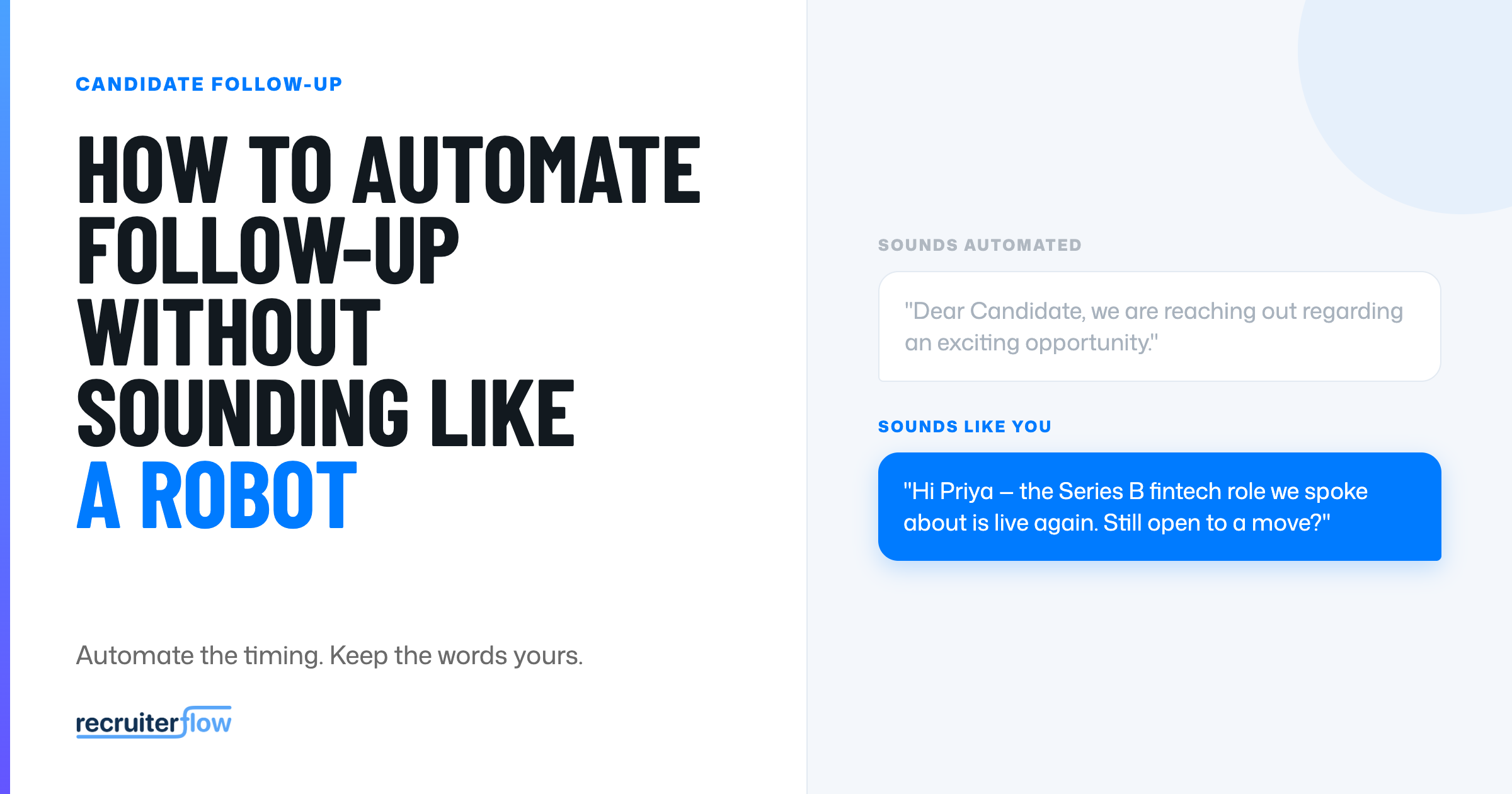
“Hi FIRST_NAME, thank you for your interest in this exciting opportunity.”
Every candidate has received that email: merge field unfired, warmth manufactured.
And every candidate knows what it means: a machine sent it, and no one is really paying attention.
That is the fear that keeps recruiters from automating candidate follow-up. They have felt what bad automation does to a relationship, and they would rather follow up inconsistently by hand than sound like a robot.
Those are not the only two options.
Candidate follow-up automation, done well, keeps candidates informed and engaged without ever reading like a mail-merge.
This guide covers why follow-up breaks down at scale, what makes automation sound robotic, and how to automate the candidate follow-up while keeping it human.
Why is candidate follow-up so difficult to automate?
Follow-up is easy with five candidates. It collapses at fifty.
A recruiter running several live roles is tracking dozens of people at different stages, each expecting an update. The follow-ups that slip are the ones no single person is chasing: the silver-medal candidate after a rejection, the applicant waiting on a hiring manager, the passive candidate mid-sequence.
That time pressure is real. Recruiters lose a large share of the week to admin and burn out on it: Recruiterflow’s research found 61% report burnout, with 45% tracing it to repetitive administrative work. Source: How AI Agents Can Help Recruiters Reduce Burnout and Bill More
So recruiters face a bad trade: follow up by hand and let some candidates fall through the cracks, or automate and risk sounding impersonal. Most choose inconsistency, because at least it feels human. The benefits of automating the process only land if the automation does not cost you the relationship, which is the real problem to solve.
What “sounding like a robot” really means
Candidates don’t resent automation. They resent feeling like a number.
Very few candidates object to receiving an automated email. They object to the tells that no one is really there. The common ones:
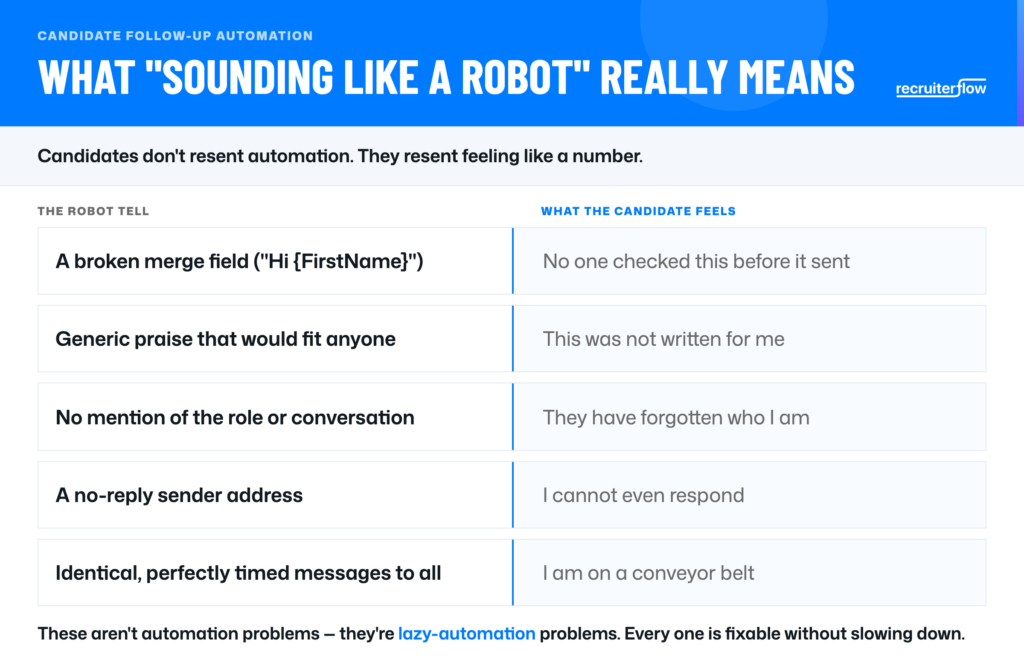
These are not automation problems. They are lazy-automation problems, and every one of them is fixable without slowing down. Fix them and automation stops eroding candidate engagement and starts protecting it.
How to automate follow-up without losing the personal touch?
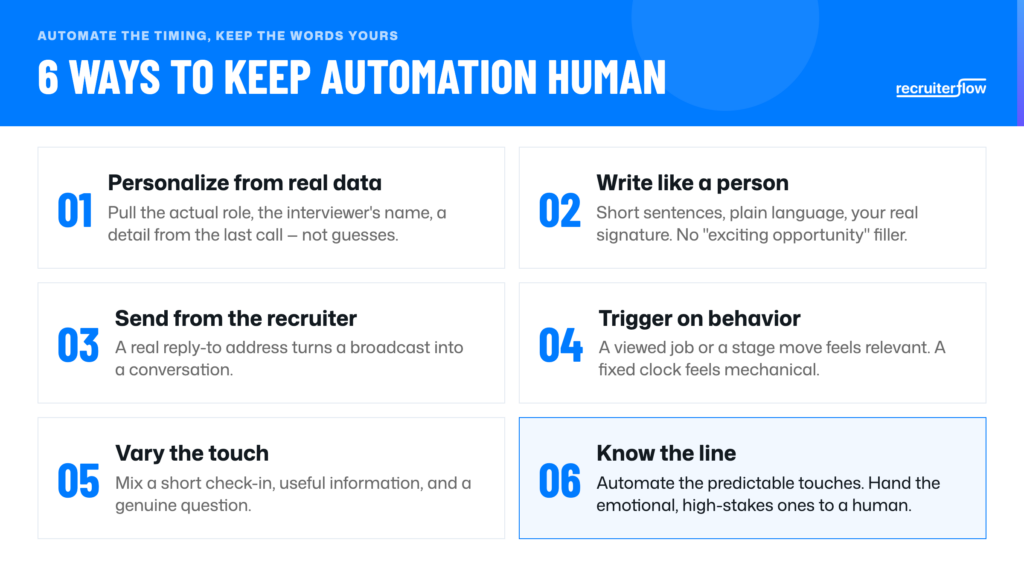
Keeping automation human is mostly about feeding it real context and knowing where to stop. Done right, recruitment automation handles the repetition while you keep the judgment. Six principles:
- Personalize from real data rather than guesses. Pull the actual role, the interviewer’s name, and a detail from the last conversation into the message. Automation that references specifics reads as attention rather than a blast.
- Write like a person. Short sentences, plain language, your real name and signature, and none of the “exciting opportunity” filler.
- Send from the recruiter and let candidates reply. A real reply-to address turns a broadcast into a conversation.
- Trigger on behavior where you can. A follow-up that fires because a candidate viewed the job or moved a stage feels relevant; one that fires on a fixed clock feels mechanical.
- Vary the touch. Do not send five identically structured emails. Mix a short check-in, a piece of useful information, and a genuine question.
- Know the line. Automate the predictable, informational touches and hand the emotional or high-stakes ones to a human, which is the next section.
What to automate vs. what to keep human
The simplest rule: automate the messages that are the same for everyone, and keep the ones that are about this person. A working split across the candidate journey:
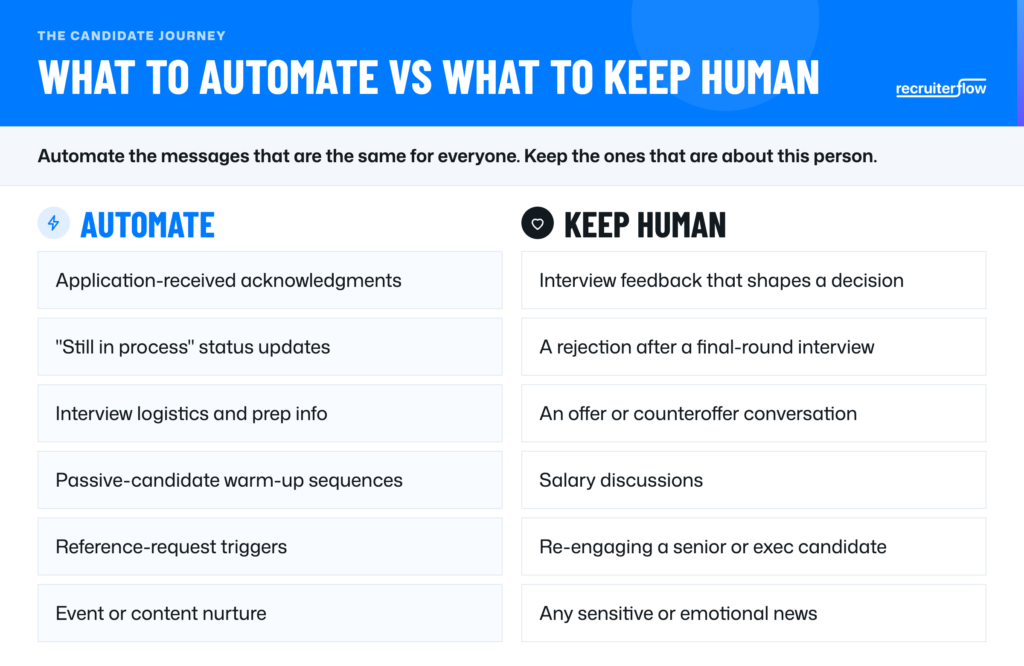
The tools that keep automation human share one trait: they personalize from real data instead of static templates.
That is where AI has changed things. Rather than a fixed drip, an agent can pull the specifics of each candidate and draft a follow-up that reads as though you sat down and wrote it.
Inside Recruiterflow, three of AIRA’s agents do this together:
- AIRA Notetaker captures what was said on the call, so the next follow-up can reference the real conversation instead of a generic line.
- The Update Field Agent keeps each candidate’s record current from calls, emails, and activity, so automation always has fresh context to work from.
- The Outreach Agent runs personalized, multichannel follow-up, adapting the message to the candidate and the channel instead of sending one template to everyone.
Together they close the gap that makes automation feel robotic. The AI does not invent warmth; it works from the real details your team already generated.
FAQs
What should a candidate follow-up email include after an interview?
A thank-you for their time, a specific reference to something from the interview, a clear next step, and a realistic timeline. Naming a detail they raised is what separates a real follow-up from a template. Keep it short, and end with when they will hear from you next.
How soon after an interview should a recruiter follow up with a candidate?
Within 24 hours for an acknowledgment, even if it only confirms timing. A same-day or next-day note keeps a strong candidate warm and signals respect for their time. If the decision will take longer, say so rather than going quiet.
What’s a good candidate follow-up email template?
The best template is a light frame you personalize: a one-line thank-you, a specific callback to the conversation, the next step, and a timeline. Avoid stock phrases like “exciting opportunity.” A template should save you keystrokes without replacing the personal detail that makes the message land.
How much does recruiting email automation cost?
It ranges from standalone email tools to automation built into your ATS or CRM at no extra per-message cost. The more useful comparison is what it saves: hours of manual follow-up and the placements lost to candidates who went cold. Price the outcome, not only the license.
Can AI write personalized candidate follow-up messages?
Yes, when it works from real data rather than guesses. An AI that can see the notes from your last call and the candidate’s current status can draft a follow-up that references specifics, which is what makes it feel personal. The recruiter still reviews and sends, so judgment stays human.
What’s the ideal candidate follow-up cadence (how many touches)?
For an active candidate, expect three to five touches across the process: an acknowledgment, status updates as things move, and prompt feedback after each stage. For passive candidates, a lighter multi-week sequence works better. The rule is to never leave a candidate wondering where they stand.
Recruitment
Ayusmita is a B2B storyteller who spends her time translating recruiting workflows into clear stories at Recruiterflow.
Ayusmita