
ATS Integrations: What Actually Connects, and What Quietly Doesn’t
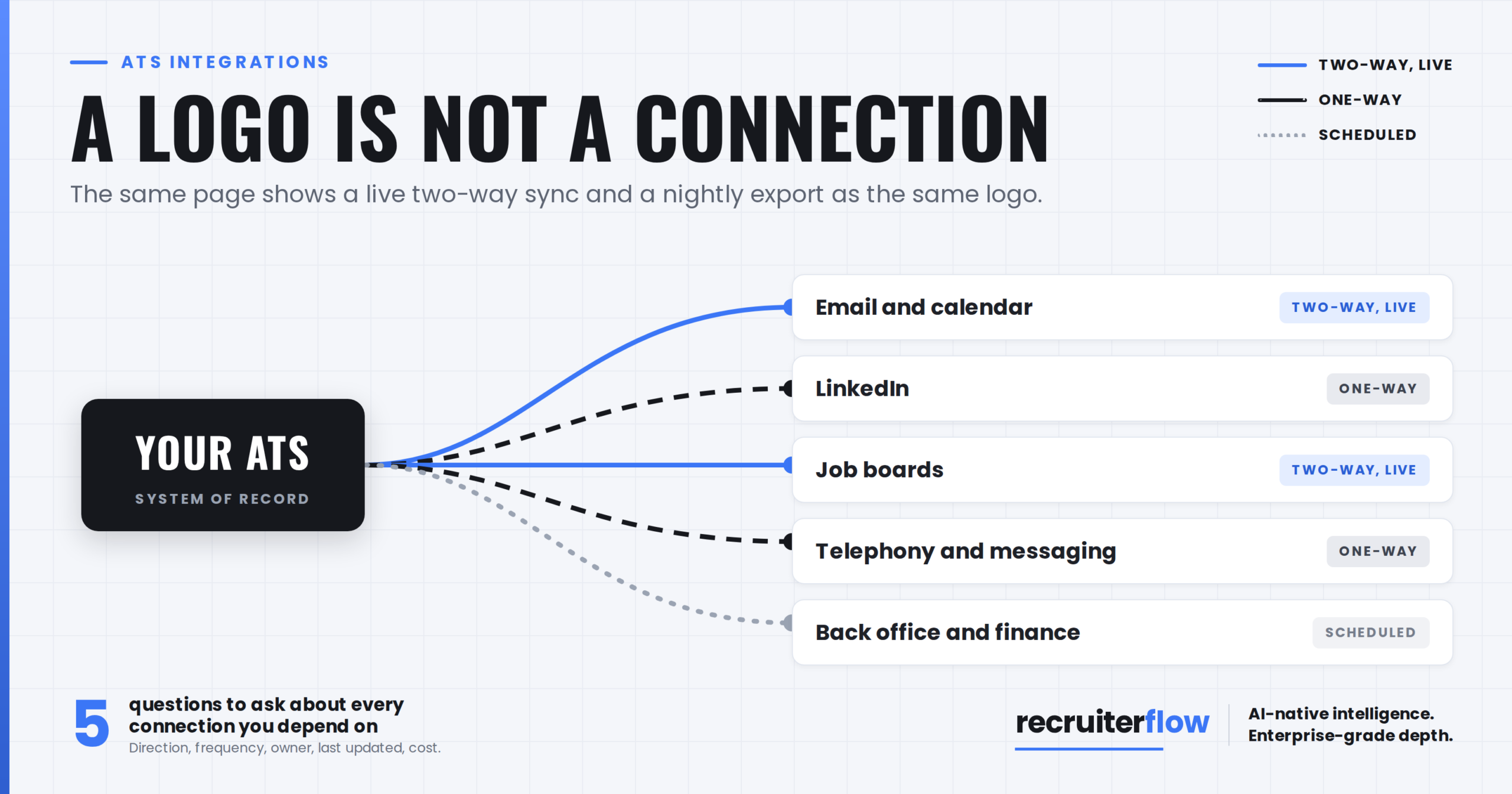
Every vendor’s integrations page is a wall of logos. A logo means a connection exists. It does not tell you what moves, in which direction, how often, or what happens when it stops.
That gap is where most ATS integration disappointment lives. The demo shows a candidate arriving from LinkedIn in one click. Nobody demonstrates the field that silently fails to map, or the sync that runs nightly when your team assumed it was live.
This post covers ATS integrations for recruitment firms: what the word actually means, which connections decide your week, the failure patterns worth knowing before you sign, and the questions that separate a real integration from a logo.
What an ATS integration actually is
The same word covers four different things, and vendors rarely tell you which one you are buying.
Native, marketplace, middleware, and API
A native integration is built and maintained by the vendor. A marketplace listing may be built by the partner instead, which matters when something breaks and each side points at the other. Middleware tools such as Zapier sit between two products and work well for simple triggers, though they add a subscription and a second place for things to fail. An open API is the escape hatch: it means your firm can build what the vendor has not.
Recruiterflow publishes its connections and an open API on its integrations page, which is the level of detail worth asking any vendor for.
One direction, two directions, or export only
Two-way sync means a change in either system reaches the other. One-way means it does not. Plenty of listed integrations are one-way, and a few turn out to be a scheduled export rather than a connection at all. Ask which of the three you are getting, per integration, not in general.
Live, scheduled, or on click
Real-time, hourly and nightly are all called sync. The difference shows up when a consultant updates a record, a colleague looks at it forty minutes later, and the two of them disagree about what the client said.
The integrations that decide your week
Most firms need five to work properly. The rest are convenience.
Email and calendar
This is the one that changes daily life. Two-way sync means conversations land on the candidate record without anyone forwarding anything, and interviews booked in your calendar appear against the job. Confirm whether it covers both major providers, whether it is per user or per firm, and whether setup carries a fee.
There is more than one way an ATS connects to LinkedIn, and they are not equivalent. Recruiter System Connect is a partner-level integration that syncs candidate data between Recruiter and the ATS, showing an in-ATS indicator, one-click export and InMail history. Supporting it requires the vendor to become a LinkedIn Talent Solutions partner and pass certification, so it is not something every platform offers.
The common alternative is a browser extension that captures profiles from LinkedIn into the ATS. Extensions work across more of LinkedIn and do not depend on Recruiter seats, which suits firms sourcing outside Recruiter. The trade-off is depth of sync. Establish which model your team actually needs before you treat either as a requirement.
Job boards
Posting out is usually easy. Getting applications back in with source attribution intact is the part that decides whether your cost-per-source reporting means anything. Ask which boards are included, which are chargeable, and whether applicants arrive as records or as emails.
Telephony and messaging
Calls and texts logged against a record are worth more than the calls themselves, because they are what the next consultant sees. Check whether call logging is automatic or manual, and whether message costs are metered by the vendor or by a provider you connect yourself.
Back office and finance
Placements eventually become invoices. Whether that handoff is an integration, a CSV, or a person retyping numbers is worth knowing before you find out in month two.
What breaks, and why
Field mapping nobody owns
The most common failure is not technical. Two systems have different fields, somebody decides how they correspond during implementation, and nobody documents it. Six months later a report is wrong and no one can say why. Treat mapping as a deliverable with a named owner, the same way you would treat switching without losing candidate history.
You can also check our blog on ATS Implementation: What Actually Happens After You Sign
Rate limits and sync lag
Every API limits how much can move per hour. That limit is invisible until a bulk update queues behind it. Ask what happens when the limit is hit: does the sync retry, drop the change, or surface an error someone will actually see.
The integration that is a recipe
If the connection runs through a middleware tool, you own it. When the partner changes a field name, your recipe breaks quietly and the fix is yours. That is a reasonable arrangement, but only if you knew you were agreeing to it.
Version drift
Partners deprecate old API versions. A connection built three years ago against an endpoint that no longer exists stops working, and how quickly it is repaired depends on whether anyone at the vendor still owns it. Ask when each integration was last updated.
Why this is worth the scrutiny
An integration that fails silently does not announce itself. It shows up as a consultant retyping notes, a report nobody trusts, and a database that gradually stops reflecting reality.
Against a $168,000 annual revenue gap per recruiter between top-quartile firms and everyone else (Source: The Economics of Recruiting), the hours lost to a connection that only half works are not a technical inconvenience. They are the difference between two firms with identical headcount.
Five questions to ask before you sign
- For each integration I need: native, marketplace, middleware or API, and who maintains it.
- One-way or two-way, and which specific fields move in each direction.
- Real time, scheduled or manual, and if scheduled, how often.
- When was this integration last updated, and who do I contact when it breaks.
- What does it cost, including any middleware subscription and any setup fee.
Get the answers per integration rather than as a general reassurance. A vendor who can answer five questions about one connection can usually answer them about the rest.
The logo wall is not the answer
Integrations are the part of an ATS evaluation most often assessed by counting. Counting tells you almost nothing, because a native two-way live sync and a nightly one-way export appear on the page as the same logo.
Ask the five questions above about the connections your desk depends on. If you are still comparing platforms, our guide to evaluating an AI-native platform covers the wider decision, and what ATS pricing actually includes is worth reading alongside it, because integration fees are one of the line items that arrive after the licence.
Bring your integration list to a demo and we will tell you which ones are native, which are middleware, and which we do not have.
FAQs
What is an ATS integration?
A connection between an applicant tracking system and another tool that moves data between them. The important detail is which direction data moves, how often, and whether the vendor or a third party maintains it.
Which ATS integrations matter most for a recruitment firm?
Email and calendar, LinkedIn, job boards, telephony and messaging, and back office or finance. Everything else tends to be convenience rather than daily workflow.
What is the difference between a native integration and a Zapier connection?
A native integration is built and maintained by the vendor. A Zapier connection is built by you or your team on top of a third-party subscription, so you own the maintenance when either side changes.
Do I need an ATS with an open API?
Not always, but it is what you fall back on when a tool you depend on is not on the vendor’s list. If your firm runs anything unusual, an open API is worth more than a longer logo wall.
What is Recruiter System Connect?
A LinkedIn partner integration that syncs candidate data between LinkedIn Recruiter and an ATS. Vendors must become LinkedIn Talent Solutions partners and pass certification to offer it, so support varies by platform.
How do I test an ATS integration before buying?
Ask for a sandbox with the integration switched on, then run your own scenario: create a record in one system, change it in the other, and see what arrives. Ten minutes of that is worth more than any feature list.
Recruitment
Ayusmita is a B2B storyteller who spends her time translating recruiting workflows into clear stories at Recruiterflow.
Ayusmita