
LinkedIn InMail for Recruiters: Templates, Limits, & When to Use It

TL;DRRecruiters overuse email on candidates who'd actually reply to InMail, and underuse it once credits run low. This gives the real numbers to fix that: InMail credits by plan (5 to 150/month), the 200/1,900 character caps, and the 90-day rule where you get your credit back if a candidate responds, even to decline. InMail beats email on response rate (18–25% vs. 1–10%) but caps out fast; email is unlimited but slower to land. Five templates built for quick personalization, and the habits that actually move response rate: under 400 characters, personalized opener, no Friday sends. |
LinkedIn InMail lets recruiters message any LinkedIn member directly — even someone you’re not connected to. In practice, that means reaching a passive candidate the moment you land on their profile, instead of firing off a connection request and waiting days for an accept that may never come.
But InMail isn’t unlimited, and it isn’t automatic. You get a fixed number of credits, a character cap on every message, and a response rate that swings hard depending on how you write and time it. Used well, it’s the fastest line to a hard-to-reach candidate. Used like a mass email, it’s wasted credits.
This guide covers what LinkedIn InMail actually is for recruiters, how many credits you get, ready-to-use InMail templates, and when it beats a cold recruiting email outright.
Quick Recap: What Is InMail on LinkedIn?
InMail is LinkedIn’s paid messaging feature. It lets Premium, Sales Navigator, and Recruiter account holders message any member on the platform, not just first-degree connections.
Every InMail lands in two places at once: the recipient’s LinkedIn inbox and their email notification. That’s part of why it performs well. It shows up somewhere a candidate is more likely to actually see it.
Unlike a regular LinkedIn message, InMail doesn’t require a prior connection. That’s the entire point of paying for it.
LinkedIn InMail Credits and Limits
Every InMail you send uses one credit. How many credits you get depends on your plan.
| Plan | InMail credits per month |
| Premium Career | 5 |
| Premium Business | 15 |
| Sales Navigator (Core/Advanced) | 50 |
| Recruiter Lite | 30 |
| Recruiter Corporate | 150 |
A few rules that catch people out:
Credits roll over, with a cap.
Unused credits carry into the next month, but LinkedIn caps accumulation at roughly three months’ worth of your plan’s allocation. You can’t bank credits indefinitely.
You get a credit back if they respond.
If a recipient replies within 90 days, even to decline, LinkedIn refunds the credit. If they never respond, the credit is gone for good.
You can’t message the same person twice.
Not until they reply to your first InMail. So make the first one count.
The character limit is fixed.
Subject lines cap at 200 characters. The message body caps at 1,900 characters. LinkedIn shows a live counter as you type, so you’ll never get cut off mid-sentence.
LinkedIn InMail Templates for Recruiters
A template is a starting point, not a script. Swap in real details about the candidate’s work, and cut anything that reads like it was sent to 200 people.
Template 1: The direct opener
Subject: Quick question about [Job_Title] roles
Hi [Candidate_Name],
I came across your work in [Skillset] at [Current_Company] and wanted to reach out directly.
I’m working on a [Job_Title] role at [Company_Name] that lines up closely with your background, particularly [specific project or skill].
Worth a quick conversation? Happy to share more either way.
[Your_Name]
Template 2: The mutual connection
Subject: [Mutual_Connection_Name] suggested I reach out
Hi [Candidate_Name],
[Mutual_Connection_Name] mentioned your work on [Project/Skill] when I described a role I’m hiring for.
It’s a [Job_Title] position at [Company_Name]. Given what [Mutual_Connection_Name] said about your experience with [Specific_Skill], I think it’s worth a look.
Open to a short call this week?
[Your_Name]
Template 3: The passive candidate, low pressure
Subject: Not urgent, but relevant to your background
Hi [Candidate_Name],
I know you’re likely not looking. Flagging this anyway because it’s a strong match for your background in [Skillset].
[Company_Name] is hiring a [Job_Title], and your experience with [Specific_Achievement] stood out.
No pressure either way. If it’s not the right time, I’m happy to stay in touch for the future.
[Your_Name]
Template 4: Referencing recent activity
Subject: Saw your post on [Topic]
Hi [Candidate_Name],
Your recent post on [Topic] was a sharp take, and it’s exactly the kind of thinking [Company_Name] is looking for in their next [Job_Title].
I’d love to share more about the role. Do you have 15 minutes this week?
[Your_Name]
Template 5: The referral ask
Subject: Know anyone who fits this?
Hi [Candidate_Name],
Congratulations on the move to [New_Company]. I’ll keep this short since you’re likely settled in.
I’m hiring a [Job_Title] for [Company_Name] and thought of your network given your background in [Industry]. If anyone comes to mind, I’d appreciate an introduction.
Thanks either way, and good luck in the new role.
[Your_Name]
For cold outreach that doesn’t rely on InMail credits at all, these recruiting email templates cover the same scenarios over email.
LinkedIn InMail vs Email for Recruiters
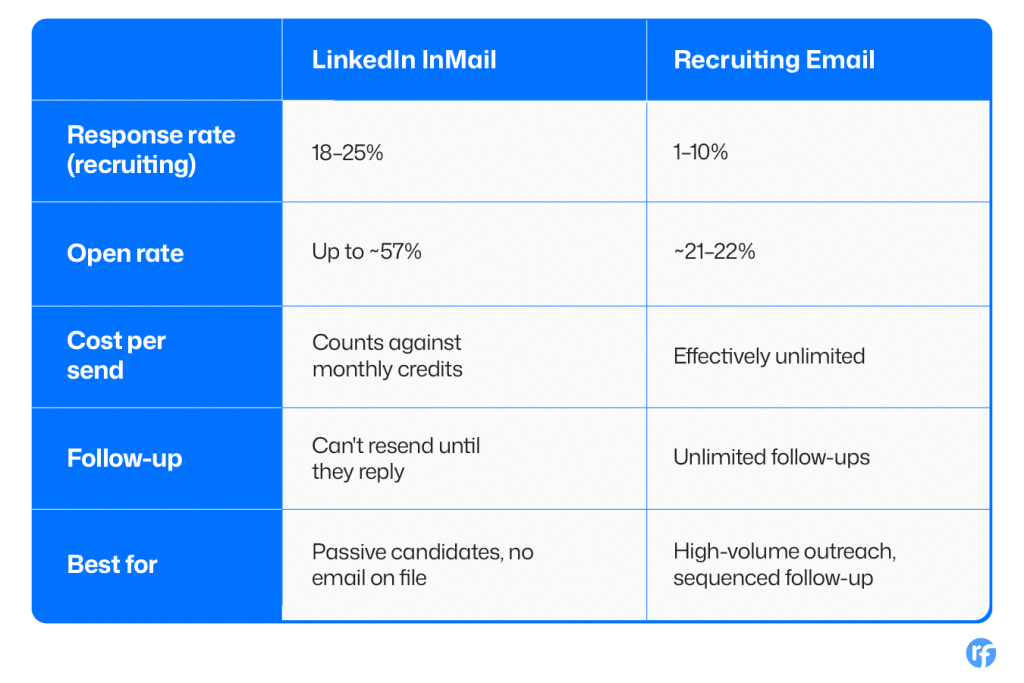
Both channels work. The right one depends on the candidate, the credits you have left, and how fast you need a reply.
Use InMail when:
- You don’t have a verified email for the candidate
- The candidate is highly passive and unlikely to open a cold email
- You’re targeting someone senior who’s easier to reach through a shared platform than a stranger’s inbox
Use email when:
- You’re running a sequence with multiple follow-up touches
- You’ve already burned your InMail credits for the month
- You have a verified email and want unlimited, uncapped outreach
For most searches, the answer isn’t one or the other. It’s InMail as the opener for hard-to-reach candidates, and email carrying the sequence and follow-ups after that. What actually affects your email outreach performance matters just as much as which channel you pick.
LinkedIn InMail Best Practices
Keep it under 400 characters.
LinkedIn’s own data shows InMails under 400 characters get a 22% higher response rate than average. Messages over 1,200 characters perform 11% below average. Say less.
Personalize the first line.
A generic opener is the fastest way to get ignored. Reference something specific: a project, a post, a shared connection.
Write your subject line to be read on mobile.
Subject lines are capped at 200 characters, but most of that gets cut off on a phone. Front-load the point in the first 40 characters.
Send on weekdays, not Friday afternoon or the weekend.
Response rates drop noticeably for messages sent late in the week or on Saturdays.
Follow your target on LinkedIn first if you can.
Candidates who already follow your company page respond to InMail at a meaningfully higher rate than cold recipients.
For a wider view of what else works on the platform beyond InMail, see this rundown of LinkedIn recruiting strategies.
How Recruiterflow Aligns With LinkedIn and Email Outreach
Credits and character limits are LinkedIn’s rules to manage, not something a recruiting platform can change. What a platform can do is make sure InMail and email work together instead of living in two separate places.
Recruiterflow’s Multichannel Sequences run LinkedIn and email in the same sequence, with branching logic that routes each contact automatically.
If a contact is already connected on LinkedIn, they get a LinkedIn message. If not, they get an email instead. No manual routing, no missed follow-up because a recruiter forgot which channel a candidate was on.
That sits alongside the broader automation layer recruiters use to manage follow-ups, reminders, and pipeline movement without doing it by hand.

FAQs
What is InMail on LinkedIn?
InMail is LinkedIn’s paid messaging feature that lets Premium, Sales Navigator, and Recruiter users message any member directly, even without a prior connection. It’s available on paid plans only.
How many LinkedIn InMail credits do recruiters get per month?
It depends on the plan. Recruiter Lite includes 30 credits per month, and Recruiter Corporate includes 150. Sales Navigator plans include 50.
What is the difference between LinkedIn InMail and a regular LinkedIn message?
A regular message only works between first-degree connections. InMail lets you message anyone on LinkedIn, connected or not, which is why it requires a paid plan and a credit per send.
What is the LinkedIn InMail character limit?
InMail subject lines are capped at 200 characters, and the message body is capped at 1,900 characters. LinkedIn shows a live character counter as you type.
What are the best LinkedIn InMail templates for recruiters?
The best templates lead with something specific to the candidate: a project, a mutual connection, or recent activity. Generic templates that could apply to anyone consistently underperform personalized ones.
Recruitment
Ayusmita is a B2B storyteller who spends her time translating recruiting workflows into clear stories at Recruiterflow.
Ayusmita