
LinkedIn Outreach Strategies for Recruiters That Get Replies
A recruiter sends 80 LinkedIn connection requests, gets a handful of acceptances, and lands three replies — then concludes LinkedIn doesn’t work.
LinkedIn works. The outreach was built for the wrong job. Most LinkedIn outreach advice — and most of the tools recruiters borrow to run it — was written for salespeople chasing buyers. Recruiting is a different sport: you’re not selling a product, you’re opening a career conversation, and the person on the other end isn’t in-market the way a sales lead is.
This guide is the recruiting version. We’ll get into why most LinkedIn outreach strategies get ignored, what a LinkedIn outreach strategy that actually gets replies looks like, how to write messages that stand out, how to run multi-touch sequences at scale, and how to pull it all off without getting your account restricted — so more of the people you reach out to actually write back.
Why Most LinkedIn Outreach From Recruiters Gets Ignored
Three reasons, and they compound.
It reads like sales.
Most templates floating around were designed for sales reps booking demos — value props and a push toward a meeting. Drop that tone on a passive candidate and it lands as spam. A senior engineer who’s happy in their job doesn’t want a pitch; they’ll respond to a relevant, low-pressure reason to talk.
It’s generic.
“I came across your profile and was impressed” tells the recipient you ran a template. Personalized connection requests are accepted around 45% of the time; generic ones languish closer to 15%. The gap is simply whether the message proves you actually looked.
It ignores where the candidate is.
Sales tools personalize on a recent post or a mutual connection. Recruiting has far richer signals — a job change, time in role, a past company, a specific skill set — and they live in your ATS, not a sales lead list. Outreach that references the right signal at the right moment reads like a one-to-one note, because it is one.
The Anatomy of a LinkedIn Sequence That Gets Replies
A single message is a coin flip. A sequence — a planned series of touches across the right channels — is what turns one ignored message into a conversation. Here’s the spine for recruiters.
1. The connection request, with a note.
For most candidates, start here. A personalized note lifts acceptance to around 45% and earns you the cheaper, higher-converting channel: once connected, a direct message to a first-degree connection replies at 25–35%, well above any cold channel.
2. The first message.
Sent after they accept — short, specific, and about them, not the role. This is where your candidate sourcing signals earn their keep: reference the exact thing that made you reach out.
3. Follow-ups.
Most replies come after the first touch, not on it. Two or three follow-ups, each adding a new angle or piece of value — never “just bumping this” — spaced a few days apart. Sequenced follow-ups convert markedly better than one-and-done.
4. InMail, for passive or out-of-network candidates.
When you can’t or don’t want to wait on a connection, InMail reaches anyone. For recruiting it’s the strongest cold channel on LinkedIn: recruiting sees InMail response rates around 18–25% — the highest of any industry — versus 1–5% for cold email. Use it where it counts; credits are limited.
Writing First Messages and InMails That Stand Out
Every recruiter is in the same inbox. Standing out is less about clever copy and more about relevance, brevity, and a low-friction ask. A few rules that hold up in the data:
- Keep it short. Messages under ~400 characters (50–70 words) get materially higher reply rates. Say one thing.
- Lead with the signal, not yourself. Open on the reason you reached out — their work, a move, a project — before anything about you or the role.
- Make the ask small. “Open to a quick chat?” beats “Can we schedule 30 minutes Thursday at 2?” Lower the cost of saying yes.
- Trigger beats template. Outreach tied to a recent event — a promotion, a job change, company news — lifts response by roughly a third. Timing is personalization.
Some recruiting-specific frameworks to adapt:
Connection note (passive candidate):
Hi [Name] — your work on [specific project] at [company] caught my eye. I partner with [niche] teams on [role type] and wanted to connect. No pitch — just worth knowing each other in this market.
First message after they accept:
Thanks for connecting, [Name]. I won’t spam you about roles — but given your move into [area] last year, I’m seeing a few [type] mandates that might be worth a look down the line. Want me to keep you posted, or is now not the time?
Follow-up (a few days later, new value):
One more thing, [Name] — [a specific market insight, comp benchmark, or a company hiring for their skill set]. Happy to share more if it’s useful. No rush either way.
Cold InMail (out-of-network):
Subject: [Company]’s [team] + your [specific expertise] Hi [Name] — I’ll keep this short. You’ve spent [X years] building [thing], and a client of mine is solving exactly that. Not asking you to jump — just whether you’d want the details. Five minutes if so.
Notice what these don’t do: no walls of text, no fake flattery, no hard close.
Multi-Touch Sequences: Timing, Channels, and Personalization at Scale
Running one thoughtful sequence by hand is easy. Running fifty is where most recruiters fall back to copy-paste — and that’s where the relevance that drives replies dies. The fix isn’t working harder; it’s a recruiting workflow that keeps every touch personal without manual effort.
Timing.
Space touches two to five business days apart. Too fast reads as pestering; too slow and you’re forgotten. Follow-ups in that window convert meaningfully better than a single message.
Channels.
LinkedIn shouldn’t run alone. A candidate who ignores a LinkedIn message might reply to an email or a text the same week. The strongest outreach moves across email, LinkedIn, and SMS — meeting each person on the channel they actually check.
Personalization at scale.
This is the hard part, and where AI earns its place. Recruiterflow’s AI-native layer, AIRA, drafts opening lines from real candidate signals — a recent job change, a past role, company news — so a sequence sent to fifty people still reads like fifty individual notes. AIRA Job Change Alerts surface the trigger; the sequence acts on it.
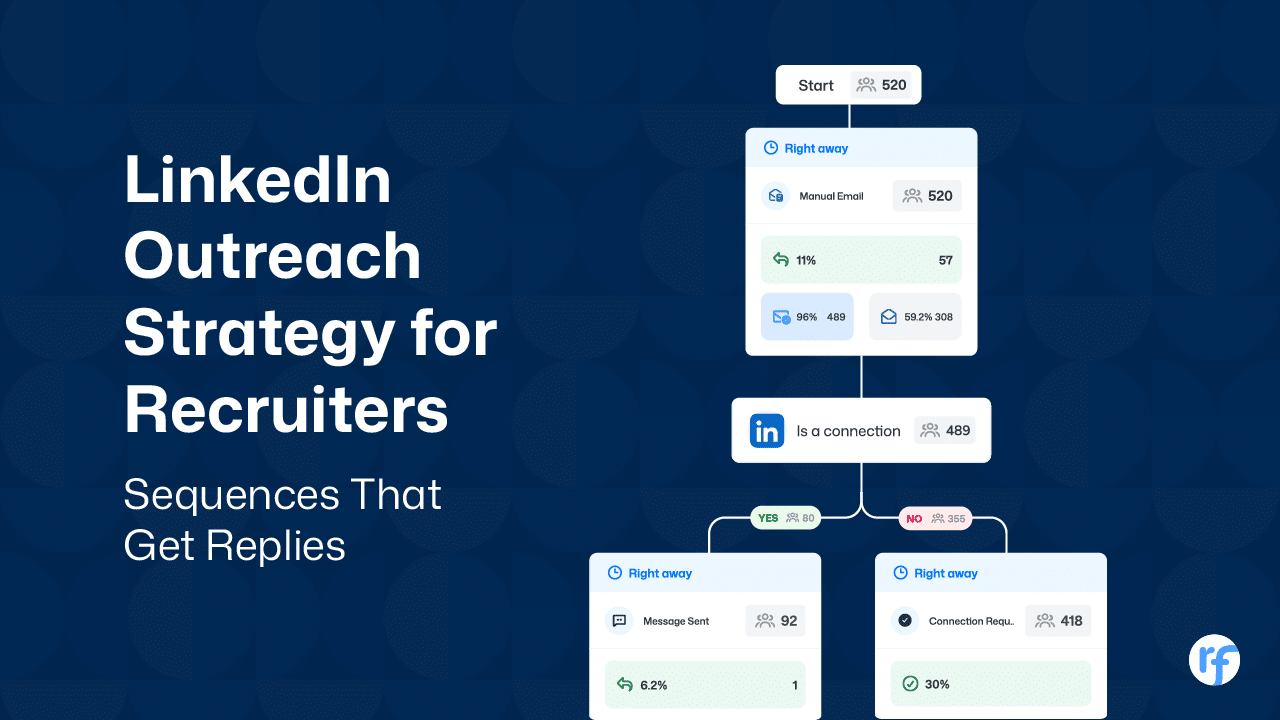
This is also where running outreach inside your CRM matters. With multichannel sequences native in Recruiterflow, every reply, connection, and step updates the candidate record automatically — and the sequence branches on its own: connected candidates get a LinkedIn message, everyone else gets an email or a connection request.
No separate tool, no context lost between systems, and no following up on LinkedIn with someone who already replied by email.

Avoiding LinkedIn Restrictions: Limits, Ban Risk, and Guardrails
Scale runs straight into LinkedIn’s limits, and ignoring them is how recruiters lose their accounts.
The connection request limit is roughly 100 per week for most accounts — weekly, not daily — stretching to 150–200 for mature accounts with a strong Social Selling Index or Sales Navigator. New accounts are throttled lower. It’s reputation-based and dynamic, not a fixed number you can game.
What actually gets accounts restricted isn’t only volume — it’s looking like a bot:
- Low acceptance rate. If fewer than ~30% of your requests are accepted, LinkedIn reads you as messaging strangers and throttles you. Better targeting protects your account.
- A pile of pending invites. Keep your unanswered backlog down; a large stack signals mass-inviting.
- Unnatural patterns. Firing every request at 9 a.m. Monday, identical timing each day — that’s bot behavior, and it trips detection even within the limits.
The takeaway isn’t “find a tool to bypass the limits” — that’s exactly how bans happen. It’s to treat LinkedIn as a quality channel: tighter targeting, personalized requests, sensible volume, and a human reviewing what goes out.
This is one more reason branching logic matters — routing an already-connected candidate to a direct message instead of burning a connection request keeps you well inside the limits while reaching more people. Outreach should work within LinkedIn’s rules, not against them.
The Bottom Line
LinkedIn outreach doesn’t fail because the channel is dead. It fails when recruiters borrow sales tactics, send generic messages, and mistake volume for strategy.
The recruiters who get replies do the opposite: they treat outreach as a sequence, personalize on real candidate signals, move across channels, and stay inside LinkedIn’s limits. Done that way, LinkedIn is still the most direct line to the people who never apply.
Recruiterflow runs all of it from one place — LinkedIn, email, and SMS sequences with AIRA-personalized openers, branching, and every touch logged against the candidate record.

Frequently Asked Questions
What are the best LinkedIn outreach tools for recruiters?
The honest answer: most popular outreach tools — Lemlist, Dripify, SourceWhale — were built for sales teams, so they sit outside your ATS and you reconcile the data by hand. For recruiters, the tool that matters is one where outreach runs inside the system that already holds your candidates and clients, so context never gets lost. Recruiterflow runs LinkedIn, email, and SMS sequences natively in the CRM; if you’d rather stitch point tools together, expect to manage the gaps between them. (For the relationship side, see our guide to candidate relationship management.)
Does LinkedIn video or voice outreach get higher reply rates than text?
Often, yes — for a simple reason: almost no one sends them, so they stand out and feel personal. The catch is they don’t scale, can’t really be automated, and hard benchmark data is thin. The practical play for recruiters is to use text and InMail for the bulk of a sequence, and reserve a 30-second voice note or video for high-priority, shortlisted candidates where the extra effort is worth it.
What are typical LinkedIn outreach response rates and benchmarks for recruiters?
Recruiting is the strongest industry on LinkedIn for outreach. 2026 benchmark analyses put InMail response rates around 18–25% for recruiting (versus 1–5% for cold email), personalized connection requests near 45% acceptance, and direct messages to existing connections at 25–35%. Trigger-based outreach — a job change or a promotion — lifts replies by roughly a third. Treat these as targets; relevance and follow-up move them more than volume does.
Cold email vs LinkedIn outreach: which gets better reply rates for recruiters?
LinkedIn wins on reply rate; cold email wins on scale. LinkedIn InMail and connection messages reply at far higher rates (often 18–25% for recruiting) than cold email, which now averages low single digits. But LinkedIn caps your weekly volume, while email scales almost limitlessly. The highest-performing recruiters don’t choose — they sequence both, so a candidate who ignores one channel catches the other.
Should recruiters use LinkedIn Sales Navigator or LinkedIn Recruiter for candidate outreach?
LinkedIn Recruiter is purpose-built for sourcing — candidate-specific filters, full profiles, project pipelines, more InMail credits, and ATS sync — but it’s expensive (the full product runs around $835/month per seat). Sales Navigator is cheaper (around $99/month), reaches a broader network, and doubles as a client-BD tool, which is why many firms pair it with their recruiting CRM instead of paying for full Recruiter. For a smaller firm, Sales Navigator plus a CRM that runs your outreach is often the more cost-effective stack.
Recruitment

Ayusmita is a B2B storyteller who spends her time translating recruiting workflows into clear stories at Recruiterflow.


Ayusmita