
Client Follow-Up Templates: 12 Sequences That Win More Job Orders
Consistency beats brilliance in business development.
The recruiter who follows up five times wins the job order that the one with the sharper pitch let slip into silence. The first message rarely lands the order; the fourth one does, and most recruiters never send it.
Business development is not usually lost at the pitch. It is lost in the silence afterward, when the follow-up that would have won the role never goes out, because the day got busy and there was no system to make it happen.
These 12 recruiting client follow-up email templates fix that. Each one is a short, multi-step cadence with copy you can adapt and send, built for the moments where job orders are won or lost.
Why follow-up wins job orders
A single email to a busy client is easy to ignore. It is not a rejection, it is a non-event, and it is where most BD quietly dies. The recruiters who win more job orders are rarely better on the first touch. They are better at the second, third, and fourth, and they add something useful each time instead of “just checking in.”
Two things make follow-up work: value on every touch and more than one channel. Email alone is saturated, so a contact who ignores your inbox may reply to a LinkedIn note the same day. The sequences below build both in. For the cold first touch that opens the relationship, pair these with your cold recruiting email templates; this guide is about everything that comes after.
How to use these sequences
- Personalize the specifics. Swap in the real role, the real pain, a real candidate. A template that still reads like a template gets deleted.
- Work more than one channel. Email, LinkedIn, and a call, in a deliberate order, beat four emails to the same ignored inbox.
- Space the touches and add value. A useful touch every few days is welcome. Four “circling back” emails are not.
- Keep the high-value relationships manual. For retained and executive search, personalize the key touches yourself. Sequences carry BD volume and mid-market follow-up consistently; they are not built to automate a senior relationship.
The 12 client follow-up sequences
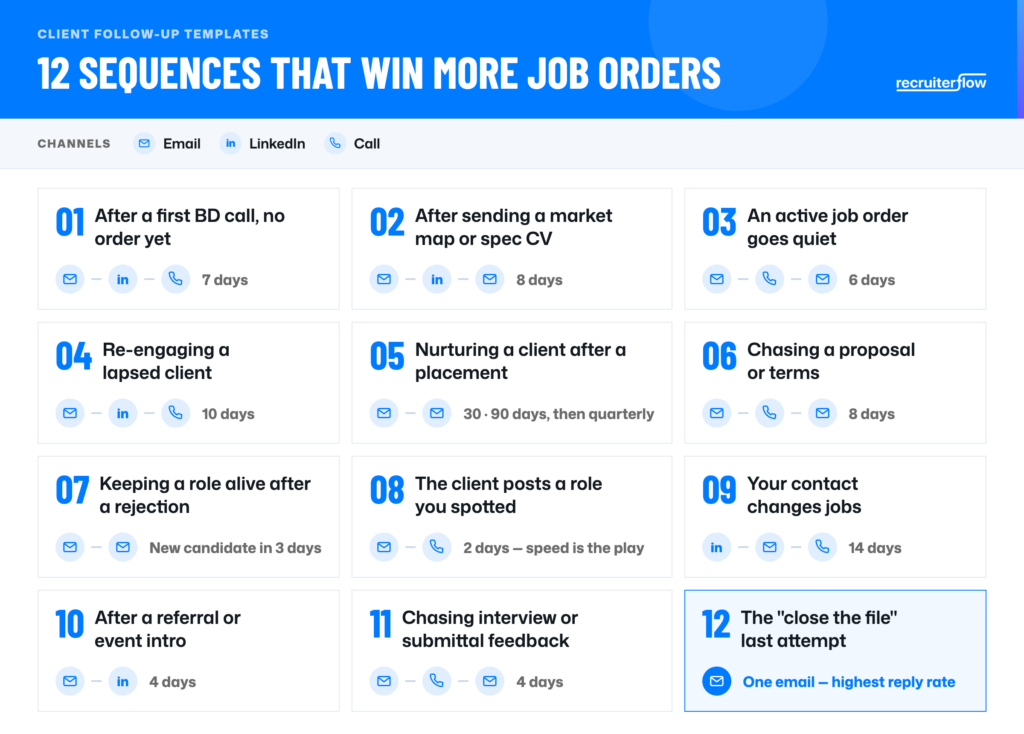
1. After a first BD call, no order yet
Cadence: email (day 1), LinkedIn connection and note (day 3), call (day 7).
Subject: [First name], the two people we discussed
Hi [First name], good speaking today. You mentioned filling [role] has been slow going. I have two people in my network who fit that brief and are open to a move. Want me to send their profiles over this week?
2. After sending a market map or spec candidate
Cadence: email with the value (day 1), LinkedIn message (day 4), email nudge (day 8).
Hi [First name], did the [role] profile land okay? No pressure if the timing is off. If it helps, I can pull a quick salary benchmark for that role in [market] so you have it for planning. Useful?
3. When an active job order goes quiet
Cadence: email (day 1), call (day 3), email with a new candidate (day 6).
Subject: Quick check on the [role] search
Hi [First name], I have two candidates ready to submit for [role] but want to be sure it is still live before I take their time. Is it still a priority, or has something shifted your end? Either answer is completely fine, I just want to keep momentum.
4. Re-engaging a lapsed client
Cadence: email (day 1), LinkedIn (day 5), call (day 10). A natural companion to your database resurrection work.
Subject: Still thinking about the [team] team at [Company]
Hi [First name], it has been a while since we worked on [past role]. I came across someone strong in [function] and thought of you. Are you doing any hiring there this quarter? Good to reconnect either way.
5. Nurturing a client after a placement
Cadence: check-in at day 30, a value touch at day 90, then a light quarterly note.
Subject: How is [Candidate] settling in?
Hi [First name], [Candidate] has been with you a month now, how are they getting on? If there is anything I can do to help them ramp, say the word. And when the next role comes up, I already know your team and your bar, so I can move fast.
6. Chasing a proposal or terms
Cadence: email (day 2), call (day 4), email (day 8).
Subject: Terms for [role], anything to adjust?
Hi [First name], sending this back up in case it slipped. Are the terms workable as they are, or is there something you would want to tweak before we start? Happy to jump on a quick call and finalize so we can get moving on [role].
7. Keeping a role alive after a candidate is rejected
Cadence: acknowledgment email (day 1), new candidate (day 4).
Subject: Noted on [Candidate], recalibrating
Hi [First name], understood on [Candidate], and the feedback on [reason] is useful. It tells me to focus on [adjusted criteria]. I have someone who fits that better, let me line them up and get a profile to you by [day].
8. The client posts a role you spotted
Cadence: fast email or LinkedIn (day 1), call (day 2). Speed is the whole play.
Subject: Saw you are hiring a [role]
Hi [First name], I noticed [Company] just posted a [role]. That is squarely my patch, I placed a [similar role] recently and have people who would fit. Before it turns into a job-board free-for-all, want me to send two or three profiles this week?
9. Your client contact changes jobs
Cadence: LinkedIn congratulations (day 1), email (day 7), call (day 14). An AIRA Job Change Alert surfaces the trigger automatically.
Subject: Congrats on the move to [New Company]
Hi [First name], congratulations on the new role. New seats usually come with new hiring plans. When you are ready to build out your team, I would love to help, the same way we worked together at [Old Company]. No rush, just planting the flag.
10. After a referral or event introduction
Cadence: email (day 1), LinkedIn (day 4).
Subject: [Referrer] suggested we connect
Hi [First name], [Referrer] mentioned you are scaling the [team] team and thought I could help. I specialize in [niche] and work with firms like [example]. Worth a 15-minute call to see if there is a fit?
11. Chasing interview or submittal feedback
Cadence: email (day 1), call (day 2), email (day 4).
Subject: [Candidate]’s feedback, quick one
Hi [First name], [Candidate] was keen after meeting the team and asked how it went. Any early read? Even a line helps me manage them and keep momentum, since strong candidates cool off fast when they are left waiting.
12. The “close the file” last attempt
Cadence: one email, sent after earlier touches have gone unanswered. It often gets the highest reply rate of the whole sequence.
Subject: Should I close the file on [role]?
Hi [First name], I have not heard back, which usually means the timing is not right or the role is on hold, both completely fine. Unless I hear otherwise, I will assume [role] is parked and stop chasing. If that is wrong, just reply and I will pick it straight back up.
Turn the templates into a system
Good copy is only half of it.
The reason follow-up fails is not that recruiters write bad emails, it is that the second and third touches depend on someone remembering to send them on a busy day.
Fix the copy and you still lose job orders to the follow-up gap.
That is what Recruiterflow Multi Channel Sequences is for.
It runs these cadences as one managed multi-channel process: email, LinkedIn connection requests and messages, SMS, and call tasks, all surfaced in the recruiter’s daily queue so the touch that wins the order goes out.
It even routes each contact to the right channel based on whether you are already connected on LinkedIn, and AIRA helps personalize each message so scale does not cost you the personal touch. Follow-up stops depending on mood and becomes something the desk does reliably.

FAQs
How many times should you follow up with a client before giving up?
More than most recruiters do. Replies tend to come from persistence, so stopping after one or two touches leaves job orders on the table. A practical rule is four to six touches across channels over two to three weeks, then a clear “close the file” message that often earns a reply on its own.
How long should a client follow-up sequence be?
For a live opportunity, two to three weeks, spaced so touches do not pile up. Longer nurtures, such as lapsed clients or post-placement check-ins, run over months at a lighter cadence. Match the pace to the stakes: an active job order moves faster than a relationship you are keeping warm.
Should recruiting follow-ups be automated or kept manual?
Automate the structure so follow-up happens regardless of how busy the week gets, but personalize the content so it does not read like a blast. For high-value and retained-search relationships, keep the key touches manual. Sequences work best carrying BD volume and mid-market follow-up with a human in the loop.
What makes a good BD follow-up subject line?
Keep it short, specific, and about the client, not you. Reference the role, the company, or a concrete next step: “Two candidates for your [role]” beats “Following up.” Avoid “just checking in,” which quietly signals you have nothing new to offer.
How do you follow up with a client without being annoying?
Add value on every touch instead of asking for a reply: a candidate, a market insight, a benchmark. Space the touches, vary the channel, and always give an easy out. Following up four times with something useful is welcome; following up four times to “circle back” is not.
Templates
Ayusmita is a B2B storyteller who spends her time translating recruiting workflows into clear stories at Recruiterflow.
Ayusmita