

Executive Search Software RFP Template
Most software RFP templates online were written for ERP rollouts and IT procurement. They ask about invoicing modules, server uptime and seat licences.
A search firm can answer all those questions well and still pick software that drops a decade of call notes during migration. Or software that shows a confidential mandate to every associate. Or software that forgets an off-limits agreement the day a placed CFO gets a call.
An executive search software RFP should cover nine sections: your firm’s background and goals, search workflow, research and talent mapping, client and BD management, AI capabilities, data migration, security and GDPR, integrations and support, and pricing. Send every vendor the same questions, run a scripted demo, and score the answers on a weighted rubric.
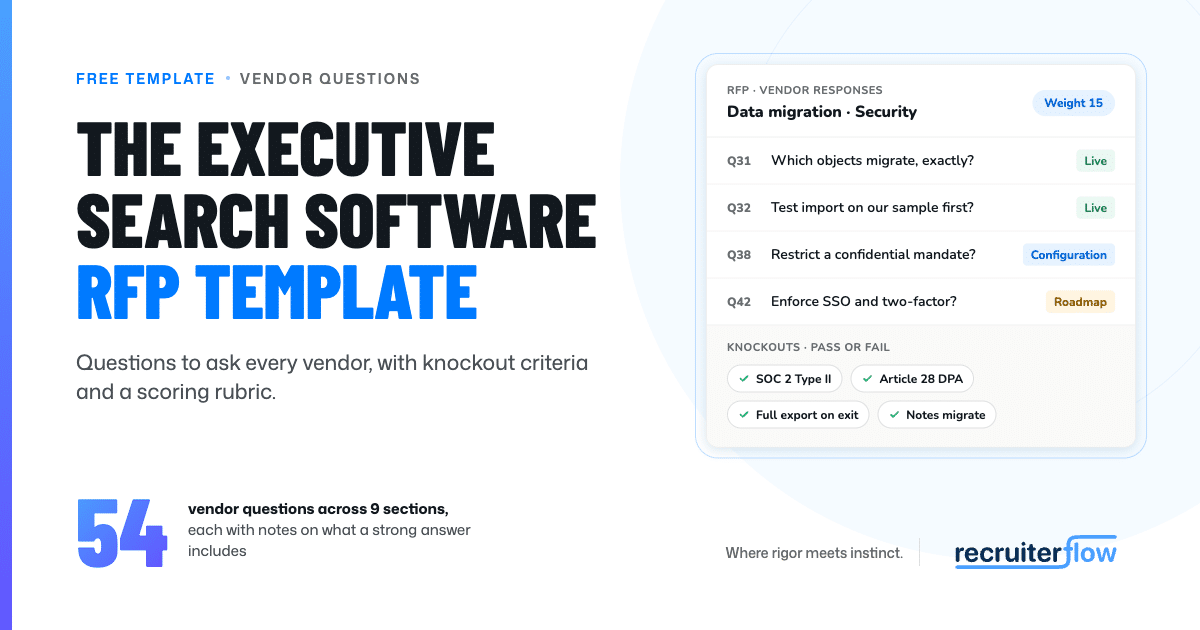
This post is a complete executive search software RFP template. It covers when to run one, the nine sections, 27 vendor questions with examples of strong answers, a scripted demo plan, a scoring rubric, a realistic timeline, and a download with the full question bank.
When should a search firm run a formal RFP?
Run a formal RFP when three or more partners have a say in the decision, when clients will ask how you protect candidate data, or when you are replacing a system that holds years of relationship history. In each case, a written process gives you answers you can compare and a record of why you chose.
Firms with fewer than 10 consultants can run a lighter version. Send the security and migration questions as a short RFI, then go straight to scripted demos with two or three vendors. The questions and the rubric stay the same. Only the paperwork shrinks.
If you are still working out what a smaller practice needs day to day, start with what boutique search firms run on.
What sections should an executive search software RFP include?
These nine sections cover the ATS requirements, CRM needs and contract terms that matter to a retained or executive search firm. Section 1 is the part you write. Sections 2 to 9 are the parts vendors answer.
- Firm background and goals. Your practice areas, number of consultants, offices, current system, and the three problems the new software must solve.
- Search workflow. How a mandate moves from kickoff and search brief through calibration, shortlist and client intros to placement.
- Research and talent mapping. Searching your own database, building target company maps, and keeping records current.
- Client and BD management. Relationship history, pitches, and how you stay in touch with senior contacts between searches.
- AI capabilities. What the AI does, what data it reads, where a consultant approves its output, and how your data is used.
- Data migration. What moves, how it is tested, how long it takes, and what it costs.
- Security, confidentiality and GDPR. Audit reports, data processing terms, confidential mandates and off-limits controls.
- Integrations, onboarding and support. Email, calendar, LinkedIn, telephony, API access, training and service levels.
- Pricing and total cost of ownership. The three-year cost, what changes as you grow, and exit terms.
If you have not built a longlist yet, this roundup of executive search software options is a reasonable place to start.
Knockout criteria: check these before you score
Some answers are pass or fail. A vendor that fails one of these is out, however well it scores elsewhere.
- A current SOC 2 report. Ask which Trust Services Criteria it covers. Security is the only category required in every report, and a Type II report tests controls over a period of time, typically 6 to 12 months (Linford & Co.).
- A data processing agreement with Article 28 terms. Under UK GDPR, the processor must delete or return all personal data at the end of the contract, at the controller’s choice, and must submit to audits and inspections (ICO).
- Full export on exit. Every record, note, attachment and activity log, in a usable format, at no extra charge.
- Migration that carries notes, call logs and email history along with the structured fields.
- Record-level permissions that can restrict a confidential mandate and its candidates to named users.
The question bank: what to ask every vendor
Below are three questions per section, each with what a strong answer includes. The downloadable template carries the full bank. For a shorter checklist written for all recruiting firms, see these questions to ask an ATS.
1. Firm background and vendor fit
How many of your customers run retained or executive search, and can we call two of a similar size? A strong answer gives a number and names reference firms close to your headcount and practice areas. You should be able to call them with no one from the vendor on the line.
What did you ship in the last 12 months? A strong answer links to a dated changelog, states a release cadence, and points to features that came from customer requests.
Who owns our account after we sign? A strong answer names an onboarding lead and an ongoing contact, and says how many accounts that person looks after.
2. Search workflow
Walk us through one mandate, from kickoff to placement, inside the system. A strong answer shows the search brief, research list, calibration, longlist, shortlist, client intros, interviews and offer on one record, with stage history and no side spreadsheets.
How do you produce a shortlist or progress report for the client? A strong answer generates a branded document from the record, editable before it goes out, that pulls in consultants’ assessment notes.
How do you track off-limits agreements? The AESC describes off-limits as a firm’s commitment not to recruit a placed candidate later, and sometimes a set group from the client’s team for an agreed period (AESC). A strong answer attaches those rules, with dates, to clients and placed candidates, and shows a warning on every record they touch.
3. Research and talent mapping
How does search work across our own database? A strong answer accepts plain-language queries such as “CFOs in PE-backed healthcare who have led a sale” and reads notes and CVs as well as tagged fields.
How do you build and keep target company maps? A strong answer links maps to people records, so research done on one search can be reused on the next.
What happens when someone in our database changes jobs? A strong answer flags job changes for the contacts you care about and updates the record without a researcher re-keying it.
4. Client and business development
Show us everything we know about one client contact on a single screen. A strong answer ties every email, call note, meeting, search and placement to that person and their company, captured from email and calendar. In search, candidates become clients and clients become candidates, which is why a unified ATS and CRM matters more here than in volume recruiting.
How do you track pitches and BD pipeline? A strong answer records opportunities with stage and value, links them to the client record, and reports them by partner.
How do we stay in front of senior contacts for 12 to 18 months without bulk emails? A strong answer offers a structured cadence across email, LinkedIn and calls. Partners and associates still write each message; the software schedules and tracks it.
5. AI capabilities
This is where vendor claims vary most. Nitin Sharma, founder of the independent directory Rectools.io, covered how to spot a “GPT wrapper” on The Resilient Recruiter (May 2026). These three questions separate AI that is part of the data model from a chat window added on top.
Which AI features work on our existing data from day one? A strong answer shows the AI reading your full history (notes, emails and call transcripts) straight after migration, including records from years before the switch.
Is our data used to train models shared with other customers? A strong answer is a direct no, or an explicit opt-in, written into the contract and the DPA, with every model provider listed as a sub-processor.
Where does a consultant approve what the AI does? The AESC’s data protection best practices ask member firms to keep human judgment in decisions, with AI supporting the expertise of search professionals (AESC). A strong answer maps which actions run on their own, which wait for a person, and where the audit trail sits. For a reference point, here is how Recruiterflow builds AIRA as the intelligence layer across workflows.
6. Data migration
Weight this section heavily. In Recruiterflow’s study of more than 2,100 search and recruiting firms, 71% of placements came from candidates already in the CRM before the search opened (Source: The Economics of Recruiting). Your database is where most future placements already sit.
Which objects migrate, exactly? A strong answer is a written field map covering people, companies, searches, notes, call logs, emails, attachments, stages and custom fields. Nothing should be labelled “best effort.”
Can we test migration on our own sample before signing? A strong answer is yes: a trial import of a few hundred records you choose, including the messiest ones.
How long does it take, and what does it cost? A strong answer gives a dated plan, a fixed fee or clear inclusion in the subscription, and a cut-over that leaves consultants working throughout.
7. Security, confidentiality and GDPR
Send your latest SOC 2 report and your DPA. A strong answer arrives the same week: a current Type II report naming the criteria in scope, and a DPA with Article 28 terms.
How do you restrict a confidential mandate? A strong answer shows record-level permissions that limit a search and its candidates to named users, with every view logged.
How do we handle erasure requests and retention? The AESC lists erasure and data portability among the rights member firms must give effect to (AESC). A strong answer shows how to find, export and delete one person’s data across every record, and how retention rules are set.
8. Integrations, onboarding and support
Which integrations are native, and which need a third-party connector? A strong answer covers email and calendar sync for Outlook and Google, LinkedIn workflow, telephony, and a documented open API.
What does onboarding look like, in days? A strong answer gives a dated plan, training sessions by role, and a named onboarding lead.
What are your support service levels, in writing? A strong answer states response times by severity, the channels offered, and hours that cover your offices’ time zones.
9. Pricing and total cost of ownership
What is the all-in cost over three years? A strong answer adds up seats, migration, onboarding, AI usage, integrations and any price-increase cap in one figure.
What do the exit terms say? A strong answer commits to a full export at no charge, in a usable format, followed by written confirmation of deletion.
What costs more as we grow? A strong answer states, now, how pricing changes with headcount, brands, offices, storage and AI volume.
How do you run a scripted demo?
A standard demo shows the vendor’s best route through the product. A scripted demo makes every vendor walk your route. Send each shortlisted vendor the same scenarios a week ahead, built on anonymised data from a real search, and give each the same time slot.
Five scenarios that test what written answers cannot:
- “Find every CFO we spoke to in 2022 who said they would consider a move.” This tests whether search reads notes or only fields.
- “Run a calibration: present five profiles to the client, record their feedback, and adjust the brief.”
- “A candidate we placed last year comes up on a new search for a different client. What does the system show?” This tests off-limits controls.
- “Import these 200 records from our current system and show us the notes on screen.”
- “Restrict this confidential mandate to two partners, then log in as an associate and show us what they see.”
The same evaluators should score every demo, during the demo, before they compare notes.
How do you score vendor responses?
Score each section from 1 to 5, multiply by its weight, and add the results for a total out of 500. Apply the knockout criteria first, so only vendors that pass them reach the rubric.
|
Section |
Weight | What a 5 looks like |
|---|---|---|
| Search workflow | 15 | Every stage of a mandate on one record, shown on your own scenario |
| AI capabilities | 15 | AI reads your full history, a consultant approves its output, your data stays out of shared training |
| Data migration | 15 | Written field map, tested on your sample, notes and call logs intact |
| Pricing and total cost of ownership | 15 | Three-year figure in writing, free full export on exit |
| Research and talent mapping | 10 | Plain-language search across notes and CVs, reusable company maps |
| Client and BD management | 10 | Full relationship history on one screen, captured from email and calendar |
| Security, confidentiality and GDPR | 10 | Current SOC 2 Type II, Article 28 DPA, record-level permissions |
| Integrations, onboarding and support | 10 | Native email and calendar sync, dated onboarding plan, written service levels |
Use one scale for every section:
- 5: Meets the requirement natively and proved it in the scripted demo.
- 4: Meets it natively, shown only in a standard demo or document.
- 3: Meets it through configuration or a workaround.
- 2: On the roadmap, with a committed date.
- 1: Not available, or no clear answer.
Each evaluator scores alone first. Then compare, and discuss any section where scores differ by more than one point. Vendor-fit answers from section 1 feed your reference calls and stay outside the total.
Change the weights to match what your firm can least afford to get wrong. A firm with 15 years of relationship history might move migration to 20. A firm running regulated or board-level mandates might do the same for security.
What does a realistic RFP timeline look like?
Plan for six to eight weeks from first draft to signed contract. Most of that time goes on vendor responses and demos, which partners fit around live searches.
| Week | What happens | Output |
|---|---|---|
| 1 | Write requirements; agree weights and knockouts with partners | Signed-off RFP |
| 2 | Narrow the longlist to three to five vendors; send the RFP | Vendor list and deadline |
| 3–4 | Vendors respond; answer their questions in one shared document, so all receive the same information | Written responses |
| 5 | Score responses; remove vendors that fail a knockout; book scripted demos | Shortlist of two or three |
| 6 | Scripted demos and reference calls | Demo scores |
| 7 | Sample migration test; security review of the SOC 2 report and DPA | Test results and sign-off |
| 8 | Negotiate price, service levels and exit terms; sign | Contract and migration date |
To finish in six weeks, run the security review alongside the scripted demos and send the migration sample as soon as the shortlist is set.
Download the executive search software RFP template
The template turns this guide into a working document. It includes:
- The full question bank: 54 questions across the nine sections, each with strong-answer notes
- The knockout checklist
- The five-scenario scripted demo plan
- A companion Google Sheet that scores every question, applies the weights above, checks knockouts and ranks vendors automatically
- The eight-week timeline
Download the RFP template once your shortlist is set, run Recruiterflow through the same process. Send us your scenarios, book a scripted demo, and score us on the same rubric as every other vendor.

Frequently asked questions
What’s the difference between an RFI and an RFP?
An RFI asks vendors to describe themselves so you can build a shortlist. An RFP asks that shortlist to answer your specific requirements so you can compare them and choose. Many search firms send a short RFI on security and migration first, then a full RFP to three or four vendors.
How many vendors should receive the RFP?
Three to five. Fewer leaves you little to compare. More than five turns scoring into a part-time job for partners who should be working on searches.
Should the RFP include pricing questions?
Yes. Ask for a three-year total that includes migration, onboarding, AI usage and any price-increase cap, along with exit terms. Prices only compare fairly once every vendor quotes the same scope.
How long should vendors have to respond?
Give vendors two weeks for a full RFP and one week for an RFI. Shorter deadlines invite copied, generic answers. Longer ones stretch your timeline without improving the responses.
Do small search firms need a formal RFP?
A short version works. A firm with fewer than 10 consultants can send the security and migration questions as a short RFI, then run scripted demos with two or three vendors using the same rubric.
The only software to future-proof your search business.

Abhishek holds 7+ years of experience in helping companies rank for over 1,000 commercial keywords with a data-driven approach. As the SEO lead at Recruiterflow, he drives strategies that boost organic visibility and ensure competitive growth. Outside of work, Abhishek is a dedicated father of two, finding balance between his passion for SEO and family life.
Abhishek Sharma