

How to Compare ATS Options for Executive Search
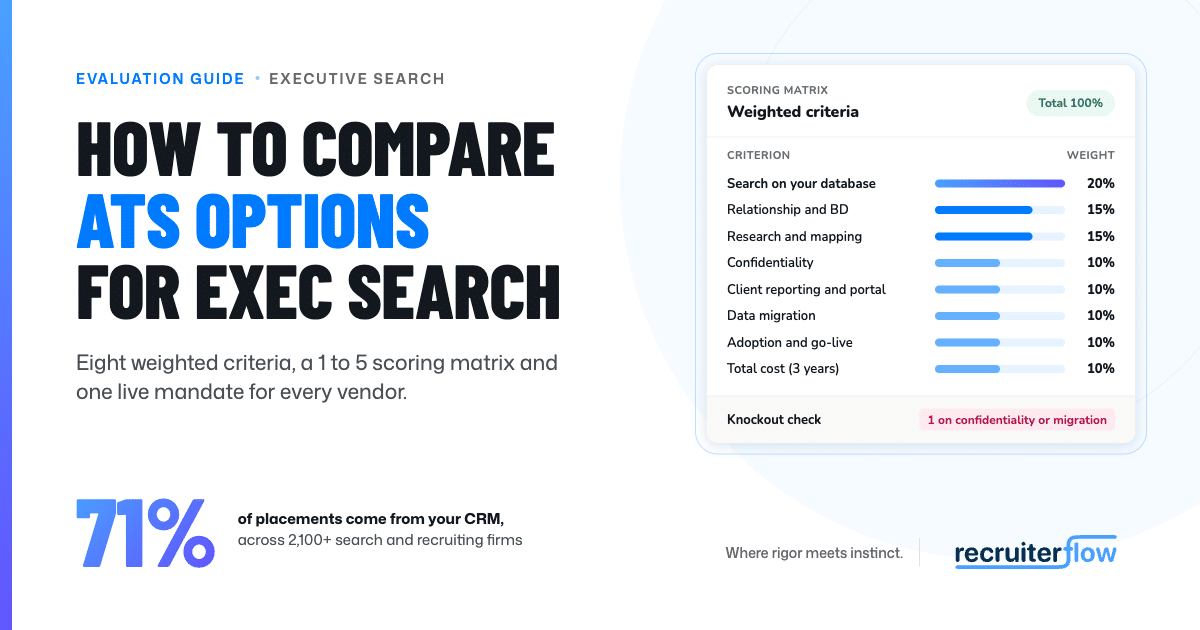
To compare ATS options for executive search, score each platform on the same eight weighted criteria:
- Relationship and BD tracking (15%)
- Research and talent mapping (15%)
- Search quality on your own database (20%)
- Confidentiality and access controls (10%)
- Client reporting and portal (10%)
- Data migration (10%)
- Consultant adoption and time to go live (10%)
- Total cost (10%)
Then run every vendor through the same live mandate, from kickoff to placement, so each score rests on a workflow you watched run.
This guide covers how to compare ATS options for executive search: the eight criteria with suggested weights, a 1 to 5 scoring matrix you can download, a seven-step demo script built around one mandate, and a dated table showing how seven executive search platforms document each criterion.
Why is comparing executive search ATS different from comparing a contingent ATS?
Contingent recruiting software is judged on throughput: time to post a role, applicant volume and speed to submission. Executive search operates on different economics. A retained mandate runs for months, fees are paid in tranches, the shortlist is five or six names, and the client relationship outlasts any single search.
That shifts what the software must do well, in three ways.
The database is the asset. According to The Economics of Recruiting, Recruiterflow’s benchmark of 2,100+ search and recruiting firms, about 71% of placements came from candidates already in the CRM before the role opened.
Recruitment coach Greg Savage makes the same point about contingent recruiting in his July 2025 post on The Savage Truth, “Is your database a ‘candidate graveyard?'”: in his experience, at least half of candidates placed through a job board or LinkedIn were already in the firm’s own database. For a firm holding fifteen years of research notes, that proportion is the investment case.
Confidentiality is a product requirement. A search for a sitting CEO’s successor, maintaining off-limits agreements with every client, and ensuring board members never see one another’s candidates all require controls built into the record. An off-limits list maintained in a spreadsheet outside the system will eventually be missed.
The client watches the process. Retained clients expect visibility between calibration and shortlist. Reporting that consumes half a day of associate time per client is a margin cost on every mandate.
These are the same pressures that shape what a serious boutique search firm runs on, and they explain why a generic feature checklist is a poor basis for the decision.
Which 8 criteria should you compare?
Compare every platform on the same eight criteria, weighted to total 100%. The weights below suit a retained or executive search firm of 5 to 50 consultants. Adjust them to your operating model before the first demo, and hold them fixed from then on.
How we set the weights: we started from an even split and moved weight toward what drives placements. Search quality gets the most because, according to The Economics of Recruiting, about 71% of placements come from candidates already in the CRM. Confidentiality and migration carry lower weights because the scoring matrix treats a score of 1 on either as a knockout, and a heavier weight would count them twice.
1. Relationship and BD tracking (15%)
In executive search, this year’s candidate is next year’s CHRO with a mandate to award. The system should keep one record per person, with every call, note, email and past assignment attached, whether that person is a candidate, a client or both. Ask each vendor whether its ATS and CRM share a single record, or sync between the two.
Test it: open a contact who was a candidate in 2019 and is now a client prospect, and check that her full history follows her.
2. Research and talent mapping (15%)
Longlists are built from target companies, organisation charts and past assignments well before any approach is made. Strong platforms let researchers map each target company’s leadership structure and reuse research from comparable past mandates. Research held in spreadsheets is lost the day the search closes.
Test it: build a target-company map for one mandate and turn it into a longlist inside the system.
3. Search quality on your own database (20%)
This criterion carries the most weight because it compounds. The Economics of Recruiting found that about 71% of placements come from candidates already in the CRM, and that share only turns into placements if consultants can find those people when a mandate opens. Search should read like a consultant’s brief and explain why each person is a match, which is where AI for executive search earns its place.
Test it: type a brief in plain language, such as “CFO who has taken a PE-backed business through a sale”, and check who comes back and why.
4. Confidentiality and access controls (10%)
Off-limits agreements, role-based permissions, candidates hidden from client view and a stated security standard such as SOC 2 and GDPR protect the firm’s reputation. A single leaked shortlist can end a client relationship built over a decade. These controls belong on the record itself, where the system enforces them without relying on anyone’s memory.
Test it: set an off-limits rule for a client’s staff, then hide one candidate from the client portal.
5. Client reporting and portal (10%)
Retained clients judge the search by what they see between calibration and shortlist. A live portal and reports generated from current data save associates hours each week and sustain client confidence through the quieter middle phase of a search. Confirm exactly what the client sees and what remains in the consultants’ private notes.
Test it: produce a client progress report from live data and time it.
6. Data migration (10%)
Your notes, call logs, emails and assignment history are the institutional knowledge you are paying to keep. A migration that carries only contact fields leaves years of context behind. Ask for a written field map before you sign, and treat a vague answer as a warning.
Test it: send a sample export and ask for a field map and a test import.
7. Consultant adoption and time to go live (10%)
A platform that partners decline to use stops accumulating institutional knowledge from the first day. The Continuity Partners case study reports an 80% reduction in onboarding time for new hires, from 7 to 10 days to 1 to 2, after the firm moved to Recruiterflow. Every day an associate spends learning the system is a day of research that goes unrecorded.
Test it: ask how long a new associate takes to work unaided, then check with two reference firms.
8. Total cost (10%)
The licence fee is one line item. Onboarding, migration services, integrations, AI add-ons, and contract terms make up the rest, and several vendors price only on request. Compare total cost over three years, since most firms keep a system well beyond the first contract.
Test it: request a three-year cost in writing, with every add-on named.
How do you score vendors?
Score each vendor from 1 to 5 on every criterion, multiply each score by its weight, and sum the results. A perfect platform scores 5.0, or 100 when multiplied by 20. Download the scoring matrix to calculate the totals automatically. It includes the weights, columns for four vendors, a knockout check and a ranking.

Use one scale for every criterion:
| Score | Meaning | Evidence needed |
|---|---|---|
| 1 | Not available | The vendor confirms it cannot do this |
| 2 | Possible only with a workaround or a paid add-on | Name the workaround or the add-on and its cost |
| 3 | Available, but slow or clumsy in the demo | Note the step that took too long |
| 4 | Works well in the demo scenario | Seen live on the vendor’s sample data |
| 5 | Works well on your own data, and references confirm it | Seen on your data, and confirmed by a reference firm |
For example, a vendor scoring 4 on search quality earns 0.8 points from that criterion (4 × 20%). The sum across all eight criteria gives its weighted score.
Four rules keep the matrix honest:
- Score during the demo. Scores recorded the following day tend to reflect the quality of the presentation more than the product.
- Use two scorers. A partner sees BD and client reporting; an associate or researcher sees research and data entry. Average their scores and discuss any gap of two points or more.
- Write the evidence. Every score gets a line in the notes column. A 5 needs proof from your own data.
- Set knockouts. A 1 on confidentiality or data migration removes the vendor, whatever its total. A high score elsewhere cannot make up for losing a decade of notes or exposing a confidential mandate.
How do you run side-by-side demos?
Send every vendor the same anonymised search brief a week before the demo, with a sample export of 200 to 500 of your own records. Ask each one to run that mandate in its product, in the order below, and time each step. The seven steps follow the executive search process your consultants already run, so the demo mirrors your firm’s working week.
- Kickoff. The vendor creates the mandate from your search brief: fee stages, client contacts and off-limits companies. Watch where off-limits rules are stored, and whether the system enforces them later in the search.
- Calibration. The vendor shares five to eight sample profiles with the client before any outreach and captures the feedback. Watch whether the client can react in a portal, and whether each comment lands on the candidate’s record.
- Research. The vendor builds the target-company list and maps the people inside each company. Watch how people link to companies, and whether past assignments for the same client surface.
- Longlist. The vendor searches your sample data with the brief written in plain language. Watch why each candidate appeared, how duplicates are handled, and whether stale job titles show up.
- Outreach. The vendor runs a structured cadence across email, LinkedIn and phone for the longlist. Partners and associates still write each message; watch whether every send, reply and call logs without manual entry.
- Shortlist and client report. The vendor produces a client report from live data. Watch the time it takes, the branding, and the line between what the client sees and the consultant’s private notes.
- Placement. The vendor records the placement, the final fee stage and follow-ups with the placed executive. Watch whether that executive becomes a client relationship for future BD.
Time each step. A task that takes the vendor’s solutions engineer twenty minutes will take your associates longer. The scoring matrix includes this script on a separate tab for scorers to follow.
How do the leading platforms compare on these criteria?
The table below shows what seven platforms say about six of the eight criteria on their own websites and pricing pages, checked on November 16, 2026. “Not stated on site” means the vendor’s public pages do not describe it, so ask in the demo. Adoption and migration quality cannot be checked from outside, which is why they live in the demo script. For a wider list of tools, see our guide to executive search software.
| Platform | CRM and business development | Research and database search | Client reporting |
|---|---|---|---|
| Recruiterflow | Unified ATS and CRM; multichannel sequences | AIRA Research, Source, Search and Matchmaker | Client portal; candidate visibility controls; dashboards |
| Clockwork | CRM; deal tracking; contracts; pitches | Research tools; Boolean search; candidate scoring; AI assessment | Client portal; longlist review; branded reports |
| Invenias by Bullhorn | BD pipelines; cross-selling; campaigns | Longlists from competitor companies and past assignments; database search not stated | Branded deliverables; Invenias Analytics; Power BI |
| Ezekia | Relationship management; BD dashboards; email sequences | Profile enrichment; similar-profile discovery; AI search | Client portal; candidate reports; dashboards |
| Thrive TRM | Relationship mapping; activity history; off-limits tracking | Market mapping and natural-language search announced in 2026 | Client collaboration and feedback portal |
| FileFinder | CRM with Outlook integration | Web and social research; database search not stated | Client portal; Word and Excel reports |
| Talentis | Executive search CRM; Chrome extension | Public-profile research alongside CRM records | Assignment pipelines; Word reporting add-in |
Each platform has a distinct strength. Clockwork builds its product around the client portal, and its pricing is public. Invenias draws on 18 years in the market and 700+ customers, according to Bullhorn, and suits firms already running Bullhorn. Ezekia’s monthly contracts reduce the risk of a poor decision. Thrive TRM places the greatest emphasis on relationship mapping, serving PE and VC talent teams as well as search firms. Talentis brings public profile data into the CRM, reducing manual data entry. FileFinder has served executive search firms for decades.
Recruiterflow is AI-native recruiting software with enterprise-grade depth in a single platform. AIRA, the intelligence layer, runs through search, notes, matching, and research, and the enterprise layer covers permissions, reporting, SOC 2 and GDPR, and migration that keeps notes and call logs intact.
According to the MBR Partners case study, the firm, which places C-level and leadership hires, increased placements by 75% after moving to Recruiterflow. The Mercury Hampton case study records a 164% increase in client submissions (client intros and shortlist deliveries) and a 65% reduction in time-to-fill.
FAQs
How many executive search ATS vendors should I compare?
Three, or four at most. Narrow the long list with a desk review against the eight criteria, then run the full demo script with each finalist. Beyond four, evaluator fatigue sets in and later demos receive less scrutiny.
Should I trust G2 ratings for executive search software?
Use them as a first filter, then read the reviews themselves. Check whether reviewers run retained or executive search firms of your size, and how recent their reviews are. A high average built on contingent or in-house reviewers says little about mandate work.
How long should an executive search ATS trial be?
Long enough for a partner and an associate to run one mandate from kickoff to shortlist, which usually means two to four weeks. Load a recently closed search so you can compare the system’s longlist with the one your team built by hand.
What’s the biggest mistake firms make when comparing ATS?
Allowing each vendor to run its own demo on its own data. The scores then reflect presentation skill, and the comparison loses its value. The second most common mistake is deferring data migration until after the contract is signed.
Can I migrate from FileFinder or Invenias without losing history?
Usually yes, if the migration plan covers notes, emails, call logs, attachments and assignment history as well as contact fields. Ask for a written field map and a test import of a sample before you sign. Recruiterflow’s migration is built to carry notes, call logs and context across, so a firm’s institutional knowledge moves with it.
Put your shortlist to the same test
Send your shortlisted vendors the same search brief and score each demo as it happens. Then put Recruiterflow through the same seven steps. Book a demo, bring your most demanding search brief and a sample of your own data, and see AIRA applied to a live mandate from your current pipeline.
The only software to future-proof your search business.
Software and Tools
Abhishek holds 7+ years of experience in helping companies rank for over 1,000 commercial keywords with a data-driven approach. As the SEO lead at Recruiterflow, he drives strategies that boost organic visibility and ensure competitive growth. Outside of work, Abhishek is a dedicated father of two, finding balance between his passion for SEO and family life.
Abhishek Sharma